Naming conventions
Naming conventions define how every asset in your project is named and where it lives, both in the engine and on disk. You author one document per project; Dousen compiles it and serves the result to every DCC addon and the Unreal plugin, so a name assembled in Blender matches what Unreal expects without anyone copying rules by hand.
How it works
- You author the document in the web portal — either as YAML (the default) or as a Lua script for computed rules (see below). Editing requires the admin role.
- The server compiles it: the taxonomy tree is resolved, every node gets its full effective validator set baked in, and errors (bad regex, malformed structure) are caught.
- Clients consume the compiled form from
GET /api/projects/:id/conventions/compiledand cache it for 5 minutes — after publishing a change, expect up to that long before every open DCC picks it up.
The current schema is version 3. Its core idea: names are assembled structurally from prefixes, suffixes, and dimensions — not from a single text template.
A complete example
YAMLversion: 3

dimensions:
  variant:
    required: false
    values: [Base, Hero, Damaged]
  lod:
    required: false
    values: [LOD0, LOD1, LOD2]
  number:
    required: false
    values: []          # empty = free-form

validators:             # global — apply to every asset
  - id: naming.convention
    severity: error
  - id: naming.no_special_chars
    severity: error

asset_types:
  StaticMesh:
    prefix: SM
    suffix: ""
    naming:
      pattern: "^SM_[A-Za-z0-9_]+$"   # guard rail the final name must satisfy
      max_length: 64
    source_path:
      mirrors_engine: true
    validators:                        # scoped to this asset type
      - id: mesh.poly_count
        severity: warning
        params: { max_tris: 50000 }
    categories:
      Props:
        folder: true
        subcategories:
          Weapons:
            folder: true
            prefix: Wep
            validators:                # scoped to this node + everything below
              - id: mesh.poly_count
                severity: error        # tightens the asset-type rule
                params: { max_tris: 20000 }
            subcategories:
              Melee:
                folder: true
With that document, a Static Mesh named Sword at Props/Weapons/Melee with variant Hero resolves to the name SM_Wep_Sword_Hero and the engine folder Props/Weapons/Melee.
The taxonomy tree
There is exactly one node shape in v3, and it repeats at every depth. An asset type's first level is authored as categories; every node in that map — and every node in any subcategories map below it — carries the same five fields: folder, prefix, suffix, required, validators, and (recursively) subcategories. There is no separate "category" or "subcategory" type in the schema, and no fixed number of levels — a leaf node needs nothing more than {}, and a studio that wants five levels of nesting just keeps writing subcategories.
static_mesh                                        asset_type — prefix "SM"
└─ Props                        folder ✓  prefix "" suffix ""
   └─ Weapons                   folder ✓  prefix "Wep"
      └─ Melee                  folder ✓  prefix ""
         └─ Daggers             folder ✓  prefix "Dgr"
            └─ (leaf — no subcategories)
An asset's place in the project is just the ordered list of node names a client walks to get there — its taxonomy path, e.g. ["Props", "Weapons", "Melee", "Daggers"]. Given that path, a Static Mesh named Sword resolves to:
- Name —
SM_Wep_Dgr_Sword: the asset-type prefix, then every matched node'sprefixin root-to-leaf order (Weapons'Wep, Daggers'Dgr— Props and Melee contribute nothing since theirprefixis empty), then the asset name. - Engine folder —
Props/Weapons/Melee/Daggers: every matched node's own name, joined by/, for nodes wherefolderistrue(the default).
Because a node's folder contribution and its name-token contribution are independent, the same node can do either, both, or neither:
- A node with
prefix/suffixset butfolder: falseshapes the name without creating a physical subfolder — useful when a studio wants aWeptoken on every weapon without a literalWeapons/directory. - A node with no
prefix/suffix(likePropsandMeleeabove) is a pure folder segment — it organizes the tree without touching the assembled name. validatorsdeclared at any node cascade to every node beneath it — see Asset validation — so a studio-wide poly budget set onstatic_meshcan be progressively tightened atProps, thenWeapons, thenMelee, without repeating the parts that don't change.
Keyword reference
Top level
| Key | Type | Required | Notes |
|---|---|---|---|
| version | int | yes | Must be 3. Missing or any other value is a compile error. |
| dimensions | map | no | Orthogonal naming axes appended to names. Default {}. |
| validators | list | no | Global rules applying to every asset. Default []. |
| asset_types | map | no | One entry per asset type. Default {}. |
dimensions.<name>
| Key | Type | Default | Notes |
|---|---|---|---|
| required | bool | false | Advisory — surfaced to client UIs; not enforced at name resolution. |
| values | list of strings | [] | The pick-list shown in DCC "Set Up Asset" UIs. Empty means free-form. Membership is not enforced at resolution. |
Dimension keys are open — you can declare any — but only variant, lod, and number participate in name assembly, in exactly that order. A custom dimension appears in client UIs and convention tags but is never appended to the name. variant is dropped from the name when its value is exactly Base.
Validator entries
The same entry shape is accepted at all three scopes — global, asset type, and taxonomy node. Placement is the scoping; there is no applies_to field. See Asset validation for rule semantics and the catalog.
| Key | Type | Default | Notes |
|---|---|---|---|
| id | string | required | Rule id, e.g. mesh.poly_count. Unknown ids are allowed (a DCC that doesn't have the rule skips it). |
| severity | string | — | error blocks export, warning is advisory. |
| enabled | bool | true | Set false to switch a rule off at this scope (and below). |
| params | map | {} | Rule-specific parameters. When a deeper scope redeclares a rule, its params are merged key-by-key over the shallower ones — so a node can tighten just max_tris without restating everything. |
| name / category | string | — | Optional display metadata; the portal fills these from the catalog. |
asset_types.<name>
| Key | Type | Default | Notes |
|---|---|---|---|
| prefix | string | "" | First token of every name of this type (e.g. SM). |
| suffix | string | "" | Last token of every name of this type. |
| naming.pattern | regex | — | A guard rail the final assembled name must match — not a template. An invalid regex is a compile error naming the asset type. |
| naming.max_length | int | — | Maximum length of the final name. |
| source_path.template_override | template | — | Where the working file lives when it doesn't mirror the engine path. See Source paths. |
| source_path.mirrors_engine | bool | true | Derived, not read: it is true exactly when no template_override is present. Writing it explicitly is harmless documentation. |
| validators | list | [] | Rules scoped to this asset type, merged over the globals. |
| categories | map | {} | The first level of the taxonomy tree. |
subcategories directly under an asset type is a compile error — the first level must be categories; subcategories only appears on nodes inside it.
Taxonomy nodes (categories and subcategories)
Every node under categories has the same shape and may nest subcategories recursively to any depth — Props/Weapons/Melee/Daggers/… is fine. An asset's place in the project is an ordered path of node names.
| Key | Type | Default | Notes |
|---|---|---|---|
| folder | bool | true | When true, the node's name becomes a folder segment in the engine path. Set false for nodes that should only shape the asset name. |
| prefix | string | "" | Name token contributed before the asset name. |
| suffix | string | "" | Name token contributed after the asset name. |
| required | bool | false | Advisory flag for client UIs. |
| validators | list | [] | Rules for this node and everything beneath it. |
| subcategories | map | {} | Child nodes — same shape, any depth. |
How a name is assembled
Dousen joins the following tokens with _, skipping empty ones:
- the asset type's
prefix - each taxonomy node's
prefix, walking the path root to leaf - the asset name
- each taxonomy node's
suffix, also root to leaf (same traversal as the prefixes) - the
variant(unless it isBase), thenlod, thennumbervalues - the asset type's
suffix
The engine folder path is derived separately: walk the same path and join the names of every node whose folder is true with /. Node prefixes and suffixes never affect the folder — only the node names do.
Finally, the assembled name is checked against the asset type's naming.pattern and naming.max_length — that's what the naming.convention validator enforces at export time.
Source paths
By default (mirrors_engine), the working file for an asset lives at the same relative path as its engine folder — a mesh headed for Props/Weapons keeps its .blend/.ma under Props/Weapons in the source root. To place sources elsewhere, give the asset type a template_override:
YAMLsource_path:
  template_override: "Art/Source/{{ category }}/{{ subcategory }}"
Templates use Jinja-style double-brace syntax. Available variables:
| Variable | Value |
|---|---|
| category | First taxonomy segment (e.g. Props). |
| subcategory | Second segment (e.g. Weapons). |
| subcategory2, subcategory3, … | Deeper segments, numbered from the third. |
| variant, lod, number, … | The dimension values selected for the asset (any selection key the DCC sends). |
This is the only place templating exists in v3. Legacy single-brace { category } syntax from older documents is migrated to {{ category }} automatically on load. The asset's name is not a template variable — names come from the structural assembly above.
Worked examples
Each row assumes the asset resolves to the given taxonomy path and dimension selections; the rendered result is what every client (Blender, the UE plugin, and the server itself for the portal's Test Script panel) computes from the same template_override string.
template_override | Taxonomy path | Selections | Resolved source path |
|---|---|---|---|
Art/Source/{{ category }}/{{ subcategory }}/Textures | Props/Weapons | — | Art/Source/Props/Weapons/Textures |
Rigs/{{ subcategory }}/{{ variant }} | Characters/Heroes | variant: Hero | Rigs/Heroes/Hero |
{{ category }}/{{ subcategory }}/{{ subcategory2 }} | Props/Weapons/Melee/Daggers | — | Props/Weapons/Melee (the template doesn't reference subcategory3, so the 4th segment is simply unused) |
{{ category }}/LODs/{{ lod }} | Environment | lod: LOD1 | Environment/LODs/LOD1 |
A template referencing a variable that isn't available for a given asset (e.g. {{ subcategory2 }} when the taxonomy path is only two levels deep) is left unreplaced, verbatim in the client-resolved source path — Blender, Maya, and the Unreal plugin all substitute known variables by literal string replacement rather than running a full template engine. Saving the YAML doesn't catch this either: the syntax check renders against an empty context and treats an undefined variable as valid, since it may well be defined once a real asset is resolved. Use Validate Names or resolve a real asset to confirm a deep template actually fills in as expected.
Authoring in Lua
When rules are computed rather than written out — dozens of asset types sharing patterns, prefixes derived from a table, per-category poly budgets from a formula — you can author the document as a Lua script instead of YAML. Switch the editor's mode selector to Lua Script (or save via the API with ?type=lua).
The contract: define a config() function that returns a table with exactly the same v3 structure as the YAML. The server runs it at save and compile time — clients always receive the same compiled JSON regardless of authoring format.
LUA-- Generate several asset types from one table.
local types = {
  { key = "static_mesh",   prefix = "SM" },
  { key = "skeletal_mesh", prefix = "SK" },
  { key = "texture",       prefix = "T"  },
  { key = "animation",     prefix = "A"  },
}

function config()
  local asset_types = {}
  for _, t in ipairs(types) do
    asset_types[t.key] = {
      prefix = t.prefix,
      naming = { pattern = "^" .. t.prefix .. "_[A-Za-z0-9_]+$" },
      categories = { Characters = {}, Environment = {}, Props = {} },
    }
  end
  return {
    version = 3,
    dimensions = { number = { required = true, values = {} } },
    validators = {
      { id = "naming.convention", severity = "error" },
    },
    asset_types = asset_types,
  }
end
The script runs in a sandbox (mlua, DousenCore's embedded Lua interpreter): only the table, string, and math libraries are available. Everything else that could touch the filesystem or reach outside the sandbox is explicitly stripped from the environment — os, io, require, load, loadfile, dofile, loadstring, dostring, package, debug, and collectgarbage are all nilled out, and even string.dump is disabled so a script can't emit a loadable bytecode chunk. Two hard limits stop a runaway script: a 1 MiB memory ceiling, and a hook that fires every 10,000 VM instructions and aborts the run with "instruction limit exceeded" — there's no wall-clock timeout, just this deterministic instruction-count trip wire, so a typo'd infinite loop fails fast instead of hanging the server. Compile errors, a missing config(), or a return value that isn't a valid v3 table are all rejected at save, with the exact error shown in the editor.
Older Lua conventions defined resolve()/validate() functions directly — that contract is retired. A script that doesn't define config() is rejected at save with a message pointing at the current one, and there's no automatic migration; port the logic into a config() that returns the v3 table.
In Lua mode the portal editor adds a Test Script panel: give it an asset name, an asset type, and a context (taxonomy path plus dimension values as JSON) and it dry-runs the script, returning the resolved name, engine path, and source path — without saving anything.
GET /api/projects/:id/conventions returns whatever you authored — the Lua source verbatim for a Lua document, YAML otherwise. The compiled JSON that clients use is always available from /conventions/compiled, whichever format you author in.
The portal editor
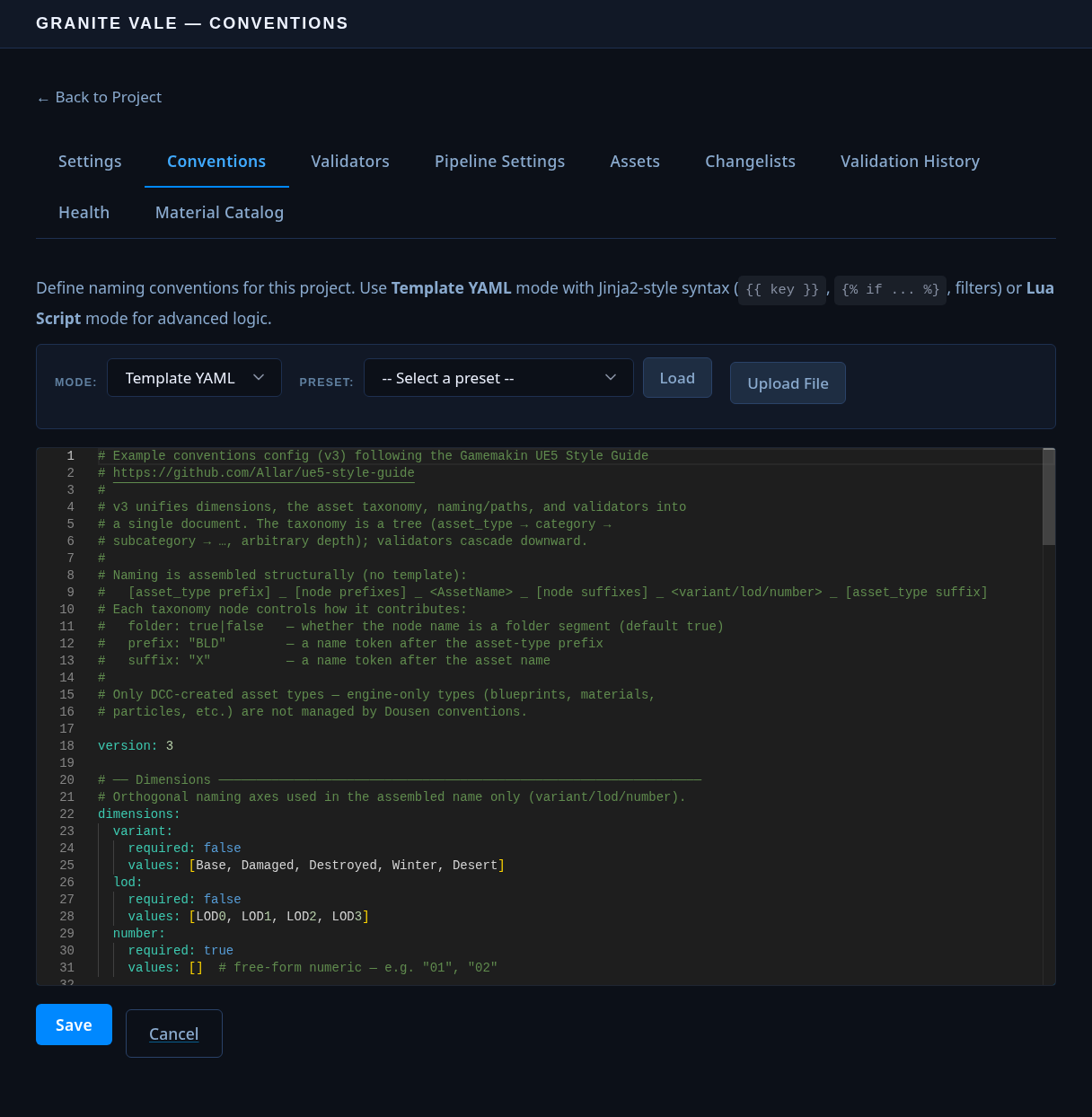
- Editor tab — a code editor with YAML and Lua modes, file upload, and presets to start from: UE5 Allar Style Guide (the default), Minimal, Nanite + Lumen — Static, Nanite + Lumen — Foliage, plus Lua versions of the Allar and Minimal presets.
- Quick Toggle tree — a master–detail view of the compiled taxonomy where you can enable/disable rules, change severities, and edit parameters per node without touching the YAML by hand. Each rule row shows whether it is added here, overridden, or inherited — and from where.
- Validate Names — paste a batch of asset names and check them against the current document before rolling it out.
How each client resolves conventions
Every client — the DCC addons, the Unreal plugin, and the portal itself — reads only the compiled JSON from /conventions/compiled. None of them parse the authored YAML or Lua; the name-assembly and path-resolution algorithm from How a name is assembled is re-implemented independently in Python and C++ against that same compiled shape, so a name built in Blender always matches what Unreal expects.
DCC addons (Blender, Maya, 3ds Max, …)
python/dousen/conventions.py ships two classes. ConventionsClient fetches GET /api/projects/:id/conventions/compiled (bearer-authed via DOUSEN_TOKEN) and caches the parsed JSON for 5 minutes (a monotonic-clock TTL); a failed fetch — network error, non-2xx, malformed JSON — is swallowed and .get() just keeps returning whatever was cached before, or None if nothing has ever succeeded.
ConventionResolver is pure logic over that cached dict, with no rendering step of its own:
taxonomy_children()drives the cascading category/subcategory dropdowns in each addon's "Set Up Asset" panel — every pick narrows the next level's options straight from the compiled tree, to whatever depth it goes.resolve()returns the suggested name, engine path, source path, and a flatconvention_tagsdict (asset_type, the/-joined taxonomy, and the selected dimension values) that gets embedded as custom properties / FBX metadata, so Unreal's importer recovers an asset's taxonomy without the artist re-entering it.infer_selections()is the reverse path for assets that predate tagging: it matches the longest asset-type prefix on the file name, walks the taxonomy tree matching path segments to node names case-insensitively, and scans path segments for dimension values — used as the validation fallback when persisted tags are missing (seeresolve_validation_scope()inpython/dousen/addons/_common.py).
The Unreal Engine plugin
FConventionsConfig parses the same compiled JSON with UE's FJsonObject. FDousenUEModule::StartupModule fetches once at editor startup and then on a recurring FTSTicker every 300 seconds (5 minutes); a failed fetch only logs a warning (LogDousenUE) and leaves the previously-parsed config untouched, so a transient DousenCore outage never wipes out a working convention set mid-session.
Resolution mirrors the Python side field-for-field, working off a flat TMap<FString, FString> of tags (asset_type, taxonomy joined by /, variant, lod, number): ResolveName assembles the same prefix/suffix/dimension chain, ResolveEnginePath joins the folder-flagged node names, and ResolveSourcePath renders a template_override with FString::Replace. FAssetSyncManager calls all three when reimporting an asset from a bridge event, so the reimported asset lands at the same name and path a DCC would have suggested.
The web portal editor
The portal is the one client that also authors the document — see The portal editor above. Its Quick Toggle tree and Validate Names panel read the freshly-compiled document on every request (no 5-minute cache), so they always reflect exactly what every other client will see once their own cache expires.
What is checked when
| Moment | What can fail |
|---|---|
| Saving YAML | Invalid YAML; invalid template syntax in template_override. |
| Saving Lua | Lua compile errors; missing config(); a return value that doesn't compile as v3 (including bad regexes) — Lua saves are fully compile-checked. |
| Compiling (fetch) | Wrong/missing version; invalid naming.pattern regex; subcategories at asset-type level; malformed validator entries. |
| Never | Unknown validator ids (clients skip rules they don't implement); dimension values outside values (advisory). |
A bad regex in a YAML document isn't caught until compile — the plain YAML save only checks syntax and templates. Use the Quick Toggle tree or the Validate Names panel right after saving to confirm the document compiles, or author in Lua, where saves are compile-checked end to end.
Who can view and edit
Reading a project's conventions requires only a valid session — any signed-in member, and every DCC addon or the Unreal plugin authenticating with its bearer token, can fetch the authored document or the compiled JSON. Saving is admin-only, enforced twice: the portal's conventions editor sits behind the same require_admin route guard as the rest of the admin section, and PUT /api/projects/:id/conventions independently rejects any caller whose JWT role isn't Admin with 403 Forbidden — so the API can't be used to bypass the portal gate.
API reference
| Endpoint | Purpose |
|---|---|
| GET /api/projects/:id/conventions | The authored document, verbatim — YAML or Lua source. A project that has never saved one gets the bundled UE5 Allar-style preset back (the same document offered as a portal starting point), not an empty document. |
| PUT /api/projects/:id/conventions | Replace the document. Admin only. ?type=lua validates and stores it as a Lua script; ?type=template, or omitting the parameter entirely, validates it as YAML. |
| GET /api/projects/:id/conventions/compiled | The compiled JSON clients consume — taxonomy resolved, effective_validators baked onto every asset type and node. |
| GET /api/projects/:id/conventions/json | Alias of /compiled. |
Clients cache the compiled document for 5 minutes. After publishing a change, expect a short delay before every DCC picks it up; the Unreal plugin refreshes on its own timer as well.
Troubleshooting
A change isn't showing up in a DCC or Unreal
This is almost always the 5-minute cache, not a bad document. Every consuming client fetches /conventions/compiled once, then reuses that copy for 5 minutes before checking again:
- DCC addons —
ConventionsClient's TTL is a monotonic 300 seconds from the last successful fetch. There's no exposed "reload conventions" button; the fastest way to force a re-fetch is to restart the DCC (a fresh process starts with an empty cache and fetches immediately). - Unreal — fetches once at editor startup, then every 300 seconds on an
FTSTicker. Restarting the editor (or reloading the plugin) forces an immediate re-fetch, same as a DCC restart. - The portal itself never has this problem — the Quick Toggle tree and Validate Names panel always compile fresh on every request.
DousenCore is unreachable
Both client implementations fail toward the last known-good document rather than erroring out:
ConventionsClient._fetch()catches network errors, non-2xx responses, and JSON decode failures, and returnsNoneon any of them —.get()then just keeps serving whatever was already cached (orNone, if nothing has ever succeeded, in which case addon code degrades to skipping convention-based suggestions and validators fall back to the built-in catalog defaults rather than the project's tuned rules).- The Unreal plugin's failure branch only logs a
LogDousenUEwarning — it never touches the previously-parsedFConventionsConfig, so an editor session that already fetched a good document keeps functioning normally through an outage.
Net effect: a DousenCore restart or network blip doesn't break a running session — everyone keeps working off the last conventions document that compiled successfully until the server answers again.
An edit to the document doesn't take effect after saving
DCC addons and the Unreal plugin never parse YAML or Lua themselves — they only ever consume the pre-compiled JSON from /conventions/compiled. If the stored document doesn't compile (bad regex, wrong version, malformed validator entry, a Lua config() that errors), /conventions/compiled and /conventions/json respond with an HTTP 500 and the compile error as the body — every client's periodic refresh then fails exactly as described above and silently keeps the previous good document, so a broken save doesn't visibly break anything until you go looking for the change that should have landed.
To diagnose a document that won't compile:
- For YAML, remember that a plain save only checks syntax and
template_overridesyntax (see What is checked when above) — a bad regex or an asset-type-levelsubcategorieskey isn't caught until the next compile. Open the Quick Toggle tree or run Validate Names immediately after saving to force a compile and surface the error. - For Lua, saves are fully compile-checked end to end, so a script that doesn't produce a valid v3 table is rejected at save time with the exact error shown in the editor — it's never possible to save a Lua document that later fails to compile.
The Python PyYAML→JSON fallback used elsewhere in the desktop app (PipelineSettingsClient in python/dousen/settings.py, for the separate pipeline settings document) does not apply to naming conventions. ConventionsClient only ever calls json.loads() against the already-compiled endpoint — there is no local YAML parsing, and therefore no fallback, anywhere in the conventions client path.