User & auth management
Dousen has two separate services, each with its own users, its own role enum, and its own JWTs: DousenControl, the cloud control plane that manages orgs and billing, and DousenCore, the studio instance an org's members actually sign into day to day (whether that instance runs on Dousen's cloud or on the studio's own hardware). This page is both a concept guide and a full reference for both. If you just want the endpoints, jump to the auth endpoint reference.
Two services, two role models
| Service | What it manages | Roles |
|---|---|---|
| DousenControl | Orgs, billing/subscriptions, and provisioning a DousenCore instance per tenant. Studios never run this themselves. | owner, admin, member |
| DousenCore instance | Projects, conventions, validators, changelists, source assets, and the studio's own users. This is the "studio instance" everywhere else in the docs. | Admin, Producer, Artist |
Both services happen to define a type called UserRole, but they are unrelated enums in unrelated databases — DousenControl's owner/admin/member govern org membership and billing; DousenCore's Admin/Producer/Artist govern one studio instance. A cloud sign-in maps the former onto the latter (see Sign-in methods), but the two are stored, checked, and versioned independently.
Roles on a studio instance
The entire web portal (/portal/* — project CRUD, conventions, validators, pipeline settings, users, changelists, assets, validation history, the health dashboard, the material-catalog viewer) is gated behind the web_portal license feature and, within that, an admin-only guard on every console page. Non-admin roles get a self-service account page instead of a 403.
| Role | Console (/portal/*) | Self-service account (/portal/account) |
|---|---|---|
| Admin | Full access to every console page. | Yes. |
| Producer | Redirected to /portal/account on any console route. | Yes. |
| Artist | Redirected to /portal/account on any console route. | Yes — but an artist's primary surface is DousenDesktop and the DCC addons, not the portal. |
The guard is a middleware, require_admin, layered over the whole console router; a non-admin who requests a console page is redirected, not rejected outright, since they still have a valid session and a landing page to go to. The JSON REST API is stricter: each admin-gated handler checks the role inline and returns a flat 403 instead of redirecting.
| REST endpoint | Guard |
|---|---|
| POST /api/projects | Admin |
| PUT /api/projects/:id | Admin |
| PUT /api/projects/:id/conventions | Admin |
| PUT /api/projects/:id/settings | Admin |
| PUT /api/projects/:id/validators | Admin |
| POST /api/projects/:id/material-catalog | Admin (the matching GET is not admin-gated) |
| Changelist mutation (vcs submit/related) | The opener, or Admin |
Creating and managing users
On a studio instance, an Admin manages users from the portal's Users page.
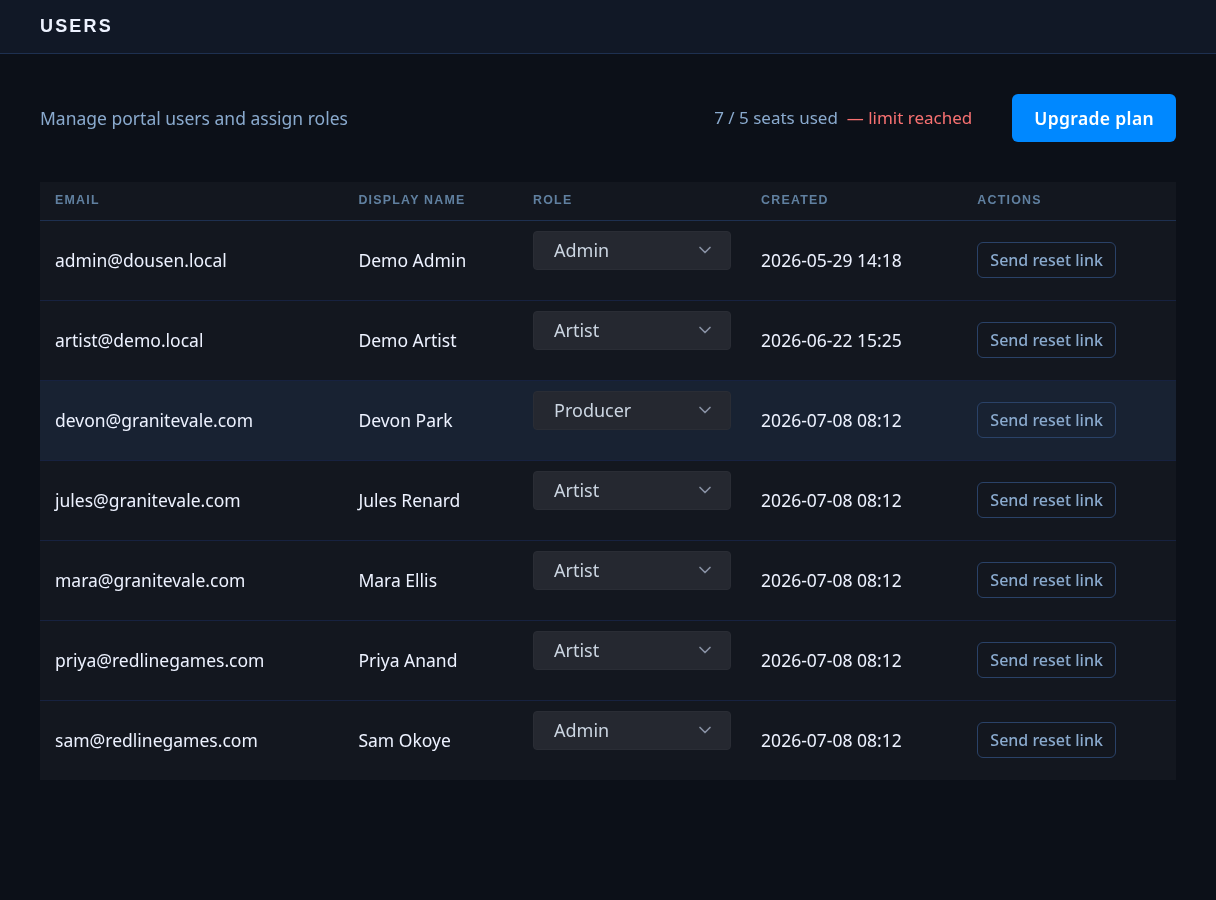
| Action | Endpoint |
|---|---|
| List users | GET /portal/users |
| Open the "add user" form | GET /portal/users/new |
| Create a user | POST /portal/users |
| Change a user's role | PUT /portal/users/:id/role |
| Send a password-reset link | POST /portal/users/:id/send-reset |
Create-user takes four fields — email, display name, password, and role (admin, producer, or artist):
HTTPPOST /portal/users HTTP/1.1
Content-Type: application/x-www-form-urlencoded

email=jane%40studio.com&display_name=Jane+Doe&password=…&role=artist
Today this sets the password directly — the admin picks the initial value and shares it with the user out of band. There is no first-login invite email on a studio instance (contrast with the cloud invite flow below, which is invite-based). The form only validates that the fields are non-empty; no minimum length is enforced on this path, so either pick a properly random initial password yourself or create the account and immediately use "send reset" so the user sets their own via an emailed link instead.
Creation checks the seat limit before inserting the row — the license's configured seat count, or 5 if no license is set at all.
Password reset & recovery
Two entry points share the same underlying mechanics — one self-service, one admin-triggered:
| Route | Who | Purpose |
|---|---|---|
| GET/POST /portal/forgot-password | Anyone, unauthenticated | Request a reset link by email. |
| GET/POST /portal/reset-password | Anyone holding a valid token | Consume the token and set a new password. |
| POST /portal/users/:id/send-reset | Admin | Trigger the same flow for a user from the Users page. |
A reset token is a random value, SHA-256-hashed before storage, valid for 1 hour, capped at 5 use attempts, and rate-limited to 3 new requests per email per hour. A new password must be at least 8 characters. Both the self-service and admin-triggered paths always render a neutral response regardless of whether the account exists, so neither leaks which emails have accounts.
Whether the admin-triggered reset actually emails anything depends on SMTP configuration (see Self-hosted install). Without it, the link is only logged to the server's own output and the portal tells the admin exactly that — "SMTP not configured — link logged to server output" — rather than claiming an email went out. Once SMTP works, the same button shows "Reset link sent."
LDAP- and SSO-provisioned accounts are excluded from this flow entirely — they carry a non-parseable password-hash sentinel instead of a real hash, so there is no local password to reset; those users authenticate through their directory or the cloud exchange every time.
Sign-in methods
| Method | How it works | Role on first login |
|---|---|---|
| Local password | DOUSEN_AUTH_MODE=local (default). Password checked against the instance's own Argon2 hash. | Set explicitly at account creation. |
| Directory (LDAP/AD) | DOUSEN_AUTH_MODE=ldap. Direct bind as the signing-in user — no service account needed; empty passwords are always rejected. | Auto-provisioned on first successful bind. Membership in DOUSEN_LDAP_ADMIN_GROUP → Admin, everyone else → Artist (never Producer via this path). |
| Browser OAuth (cloud) | DousenDesktop opens the browser to DousenControl's /oauth/authorize, using PKCE (S256) with a local loopback callback server. | Determined by cloud org role, applied on exchange (next row). |
| Cloud SSO exchange | DousenControl issues a short-lived, Ed25519-signed exchange token after OAuth login; DousenCore consumes it at POST/GET /portal/auth/exchange, gated behind the sso license feature. | Auto-provisioned on first exchange. Cloud owner/admin → instance Admin, else → Artist. |
A user who belongs to more than one cloud org sees a studio picker before landing in a specific instance, both during interactive login and during the OAuth flow.
Sessions, tokens & single-device enforcement
On a DousenCore instance, the access token is a short-lived JWT (15 minutes) and the refresh token is a longer-lived opaque value (30 days) that rotates on every use — refreshing revokes the old refresh token and issues a fresh pair. DousenDesktop's client auto-refreshes on a 401 without the user noticing.
Single-device enforcement: a refresh token can carry a device_id. If a refresh or heartbeat request arrives with a different device_id than the one stored for that session, the server answers 409 Conflict with "session active on another device" and the app surfaces that to the user — signing in elsewhere effectively ends the other session's ability to refresh.
Cloud orgs & studios (DousenControl)
Org membership is managed entirely on DousenControl, separately from any DousenCore instance.
| Role | Can do |
|---|---|
| owner | Everything an admin can, plus whatever is reserved for the org's original creator. |
| admin | Manage invites, billing/checkout, and the org's license. |
| member | Belongs to the org; no invite/billing/license access. |
People are added by invite, not by an admin setting a password:
| Action | Endpoint |
|---|---|
| Send an invite | POST /api/orgs/:id/invites (owner/admin) |
| List pending invites | GET /api/orgs/:id/invites (owner/admin) |
| Accept an invite | POST /api/invites/accept (public — the invitee isn't a user yet) |
An invite is seat-checked before it's created, expires after 7 days, and can only be admin or member (an org's owner is never assigned by invite). The invitee — not the admin — sets their own password when accepting, and it must be at least 8 characters; a second, concurrent accept on the same seat-limited org can't oversubscribe it, since the seat check and the insert happen atomically.
| Plan | Default seats |
|---|---|
| trial | 5 |
| starter | 25 |
| pro | 100 |
| enterprise | 500 |
These are the seat counts a new subscription starts with; Stripe can override the number later from the actual purchased quantity. Each DousenCore instance heartbeats its current user count back to DousenControl daily. If that count exceeds the seat limit for three consecutive heartbeats, the org is suspended (403 on further heartbeats) and the owner is emailed; a later heartbeat back under the limit auto-reactivates it. A subscription that's merely past_due on payment is never suspended for that reason alone — only a real seat overage triggers it.
Worked examples
Self-hosted: adding a new artist
- Admin opens Users.
In the portal, Users lists everyone on the instance along with the seat count used out of the license limit.
- Admin creates the account.
Email, display name, a password the admin picks, and role
artist. The seat check runs before the row is inserted — past the limit, creation is refused with the current/limit counts in the error. - The admin shares the password out of band (chat, in person — not email, since there's no invite mechanism to do that safely here) or sends a reset link instead, so the artist sets their own password on first use.
- The artist signs in from DousenDesktop or the portal, lands on their own self-service account page (not the console), and can change their password or review active sessions any time.
Cloud: inviting a teammate
- Owner or admin sends an invite from the org dashboard — an email plus a role (
adminormember). This fails up front if the org is already at its seat limit. - The invitee gets an email with a 7-day link and clicks it to accept, choosing their own password (8+ characters) at that point — the org admin never sees or sets it.
- They sign in to the studio via browser OAuth or the login form; on first arrival at a specific DousenCore instance, the SSO exchange auto-provisions their account there, mapping their cloud role to instance Admin or Artist.
Auth endpoint reference
DousenCore (per studio instance)
| Endpoint | Purpose |
|---|---|
| POST /api/auth/login | Local-account login; returns a JWT access + refresh pair. |
| POST /api/auth/refresh | Exchanges a refresh token for a new access + refresh pair (rotates on use). |
| POST /api/auth/heartbeat | Device-session heartbeat; 409 if another device now owns the session. |
| GET/POST /portal/auth/exchange | Consumes a DousenControl SSO exchange token; gated behind the sso license feature. |
| GET/POST /portal/login | Browser login form. |
| POST /portal/logout | Clears session cookies. |
| GET/POST /portal/forgot-password | Self-service reset request. |
| GET/POST /portal/reset-password | Self-service reset completion. |
| GET /portal/users, POST /portal/users | List / create users (Admin). |
| PUT /portal/users/:id/role | Change a user's role (Admin). |
| POST /portal/users/:id/send-reset | Admin-triggered reset email (Admin). |
| GET /portal/account, POST /portal/account/* | Self-service profile, password change, and session revocation — any authenticated role. |
DousenControl (cloud)
| Endpoint | Purpose |
|---|---|
| POST /api/auth/login | Org login; returns a choose_org list instead of a token if the user belongs to 2+ orgs. |
| GET /oauth/authorize | Renders the browser login form for the desktop PKCE flow. |
| POST /oauth/authorize/submit | Verifies the password; shows the studio picker if needed; issues a short-lived auth code. |
| POST /oauth/token | PKCE exchange — verifies the code verifier, issues the DousenCore-bound exchange token. |
| POST /api/orgs/:id/invites, GET /api/orgs/:id/invites | Send / list invites (owner/admin). |
| POST /api/invites/accept | Public — invitee sets their own password. |