Settings reference
All project configuration — the pipeline behavior every artist on a project shares — lives in the Dousen web management portal at /portal/ and is admin-only. DousenDesktop itself no longer carries admin-level pipeline settings; it is purely a client that reads whatever the portal publishes. This page is your reference for those project-level settings.
DousenDesktop does keep its own local settings — per machine, never synced to DousenCore — for things that are inherently per-workstation rather than per-project. See the distinction below before assuming a setting belongs in the portal.
Where settings live
Each project in the portal holds several YAML documents plus a few scalar fields, all edited from the project view:
| Setting | What it controls |
|---|---|
| Pipeline settings | Export/import behavior, texture rules, custom validator paths, OCIO, Jira-on-submit. Covered on this page. |
| Naming conventions | Asset naming rules. See Naming conventions. |
| Validators | Pre-export and admin asset checks. See Asset validation. |
| Jira config | Base URL, project key, and account email for server-side actions like Jira-on-submit. The portal form has no API-token field yet — the transition token is set at the database level for now. See Jira. |
| Perforce depot path | The depot path used to auto-create artist workspaces. See Perforce. |
Project settings vs. desktop app settings
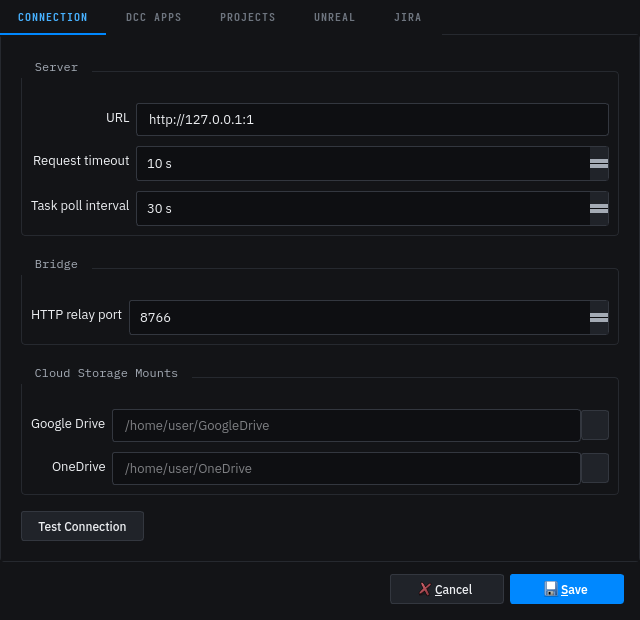
Everything above is a project setting: server-side YAML, shared by every artist on that project, edited by an admin in the portal. DousenDesktop separately keeps a small set of local settings — a JSON config file per machine, never sent to DousenCore — for things that are inherently about this workstation rather than this project. They live behind Settings in the tray app, not the portal:
| Local setting | Where it's edited | What it controls |
|---|---|---|
| DCC Apps — Launch Arguments, Environment Variables | Settings → DCC Apps, per app entry | Extra command-line arguments and env vars for launching one DCC on this machine. See Loading studio tools. |
| jiraBaseUrl, jiraEmail | Settings → Jira tab | This machine's Jira connection for fetching tasks directly from Jira (the API token is stored separately, obfuscated). See Jira tasks. |
| ueAutoImportWhenClosed, ueEditorCmdPath | Settings | Whether DousenDesktop headlessly imports assets via UnrealEditor-Cmd when the Unreal Editor isn't already polling the bridge, and the path to that executable. See Unreal Engine. |
| gdriveMountPath, onedriveMountPath | Settings | Local mount points for source assets stored on Google Drive or OneDrive instead of Perforce. |
| defaultP4Port, defaultP4User, defaultP4Workspace, defaultP4LocalRoot | First-run onboarding | Perforce connection hints used when setting up a new project's workspace on this machine. See Perforce. |
Local settings are read from this machine's config file at launch and never round-trip through DousenCore — two artists on the same project can have entirely different DCC launch arguments or Jira accounts configured. The rest of this page is exclusively about the project settings above the table.
Pipeline settings
Pipeline settings are a single YAML document per project. The recognized keys are below; unknown keys are ignored, so studio-specific notes can live alongside them.
| Key | Meaning |
|---|---|
| export_presets.<dcc>.<key> | Per-DCC export defaults. Supported DCCs: blender, maya, 3dsmax, houdini, substance_painter, substance_designer. |
| texture.allowed_formats | List of texture file formats artists may export. tga is the recommended default; png, exr and tif are also accepted. |
| validators.extra_paths | Folders to load custom validators from. See Asset validation. |
| app_paths.<dcc>.startup_scripts | Studio scripts run after Dousen's own DCC initialization. See Loading studio tools. |
| jira.on_submit_transition | Jira transition applied when a changelist is submitted. See Jira tasks. |
| ocio.config_path | Shared OCIO config path. Blank means each DCC uses its own default. |
Export presets
Each preset is keyed by DCC, then by a leaf setting; the addon reads its own DCC's block and applies whichever keys it recognizes as native export options — an unrecognized or absent key is simply skipped, not an error. Every row below is a key the corresponding addon actually reads and applies, not just a documented placeholder:
| DCC | Keys under export_presets.<dcc> | Applied as |
|---|---|---|
| blender | fbx_version, apply_modifiers, embed_textures, use_armature_deform_only, bake_anim, bake_anim_use_all_bones, bake_anim_step, axis_forward, axis_up | Keyword arguments to bpy.ops.export_scene.fbx(). |
| maya | fbx_version, apply_modifiers, embed_textures, smoothing_groups, hard_edges, tangents, smooth_mesh, triangulate | FBXExport* MEL commands run before FBXExport. |
| 3dsmax | fbx_version, smoothing_groups, tangents, triangulate, embed_textures, preserve_instances, up_axis | FBXExporterSetParam calls via pymxs. |
| houdini | alembic_format, flatten_hierarchy, save_attributes | Parameters on the Alembic ROP node (format, flatten, savealiases). |
| substance_painter | format | Export preset output file format. |
| substance_designer | format | Bake/export output file format. |
The portal's Form view renders a dropdown, not a free-text box, for the keys with a fixed value set — this is a UI convenience only; the API itself doesn't validate these values, so the YAML view (or a raw PUT) accepts any string:
fbx_version—FBX202000,FBX201900,FBX201800axis_forward—-Z,Z,-Y,Y,-X,Xaxis_up—Y,Z,X,-Y,-Z,-Xup_axis(3ds Max) —Y,Zalembic_format—Ogawa,HDF5format—tga,png,exr,tif,jpg
Texture rules
texture.allowed_formats is a list of file extensions artists are expected to export. Today it's actively checked in one place — Substance Painter's export-finished callback compares every exported file's extension against the list and prints an advisory console warning for anything outside it; it does not block the export. The other texturing paths store and round-trip the key but don't yet check against it.
TGA is the recommended source format — it's what the Substance addons export by default (export_presets.<dcc>.format defaults to tga). The source format never ships in the game: Unreal recompresses every texture to a GPU block format (BC/ASTC) at cook time, so TGA vs. PNG makes no runtime difference. TGA is preferred because it's the games-pipeline convention and carries no colour-management metadata at all — the values you write are the values that get read. That matters most for raw data maps (normal, roughness, metallic, masks), which must stay linear: PNG's optional gamma/sRGB/ICC chunks are handled inconsistently and can leave a linear map wrongly gamma-corrected somewhere in the chain, whereas TGA can't. (It also sidesteps PNG's undefined RGB under fully-transparent pixels.) For genuinely linear data needing more than 8 bits — heightmaps, HDR — use exr or 16-bit tif; 8-bit of any format bands badly when stored linear.
Within Dousen's own DCC → Unreal path this is handled for you regardless of format: the plugin's texture classifier sets each map's sRGB flag per channel on import (BaseColor and Emissive sRGB; Normal, Roughness, Metallic, AO, ARM, Mask, Height and Opacity linear), so the colour space follows the channel, not the file's chunks. The PNG ambiguity above bites mainly in general interchange between tools that trust the gamma chunk. PNG's one real edge is a smaller on-disk footprint in source control.
Texture size limits — texture.max_resolution and texture.resolution_power_of_2 — are validator rules set in the Validators tab, not pipeline settings. See Asset validation.
Custom validators
validators.extra_paths lists folders Dousen loads extra validators from. Each entry can be a Perforce path (//depot/...), a path relative to the source root, or an absolute path.
Startup scripts
app_paths.<dcc>.startup_scripts lists studio scripts that run after Dousen's own DCC init — use this to inject existing pipeline tools without disrupting the addon. Full guide: Loading studio tools.
Jira on submit
jira.on_submit_transition names the Jira transition applied automatically when a linked changelist is submitted. Matching is case-insensitive; leave it blank to disable. See Jira tasks and Perforce.
Color management
ocio.config_path points every DCC at a shared OCIO config. Blank means each DCC keeps its own default color setup.
Example
YAMLexport_presets:
  blender:
    fbx_version: FBX202000
    axis_forward: -Z
    axis_up: Y
  maya:
    fbx_version: FBX201900
    up_axis: y
  houdini:
    alembic_format: Ogawa

texture:
  allowed_formats: [tga, png, exr, tif]

validators:
  extra_paths:
    - //depot/pipeline/dousen/validators
    - ./tools/validators

jira:
  on_submit_transition: In Review

ocio:
  config_path: //depot/color/aces/config.ocio
Who can view and edit
Reading settings only requires a valid session for the project's tenant — any signed-in member (and the DCC addons, which fetch with the same server-issued token) can GET the current YAML. Saving is admin-only, enforced twice: the whole admin section of the portal (including both settings editors below) sits behind a require_admin route guard, and the raw PUT /api/projects/:id/settings endpoint independently rejects any caller whose JWT role isn't Admin with 403 Forbidden — so a non-admin can't reach it even by calling the API directly.
Editing in the portal
The project's Pipeline settings tab offers two views over the same document:
- Form view — typed fields generated from a schema: dropdowns for enum-like leaves (
fbx_version,axis_up,alembic_format,format, …), checkboxes for booleans, comma- or newline-separated lists fortexture.allowed_formatsandvalidators.extra_paths. Per-DCC groups (export presets, startup scripts) are rendered dynamically from whatever DCC keys already exist in the YAML, so a new DCC block only needs to exist in the document to get a form section. Saving the form merges the typed fields back into the existing document — any key the form doesn't know about (a studio comment, an experimental setting) is preserved untouched. - YAML view — a raw editor for the full document. Saving here replaces the whole document with what's in the editor, so it's the place to add or restructure keys the form doesn't expose yet.
Both views write through the same validation: the submitted text must parse as YAML or the save is rejected with an inline error.
API endpoint
Outside the portal, pipeline settings are also reachable directly:
| Method | Endpoint |
|---|---|
| GET | /api/projects/:id/settings |
| PUT | /api/projects/:id/settings |
The body is the settings YAML. GET returns the built-in defaults (not an error) for a project that has never saved custom settings, so a client always gets a usable document. PUT is admin-only and validates the body parses as YAML before saving; an invalid body is rejected with 400 Bad Request and the previous settings are left untouched.
How changes reach a running DCC
Propagation timing depends on which setting changed — there's no single answer:
- Export presets, allowed texture formats, custom validator paths, and the OCIO path are read by each DCC addon through a client that keeps a 5-minute in-memory cache for the lifetime of the DCC session — the same TTL pattern as the conventions cache (see Naming conventions). A change can reach an artist who is already mid-session, without relaunching, within about 5 minutes.
app_paths.<dcc>.startup_scriptsis resolved once, by DousenDesktop itself, at the moment it launches the DCC — not by the addon during the session. A change here only takes effect the next time the artist launches that DCC. See Loading studio tools.jira.on_submit_transitionis read fresh from the database on every changelist submit — there is no cache, so a change is effective on the very next submit.
Asset versioning (not a setting)
Dousen keeps immutable asset versions for published work — each version records the Perforce changelist, the Jira key, and who published it, along with the version's file representations and dependencies. This is read-only history available through the API; there is nothing to configure here.