Perforce
Dousen connects your everyday Perforce work to your Jira tasks. DousenCore talks to the Perforce server directly (via the p4 CLI in -ztag machine-readable mode) to open, submit, and shelve changelists on your behalf; separately, the desktop app and every DCC addon also run local p4 commands under your own Perforce identity for lock visibility, checkout, sync, and revert. This page covers both halves.
Endpoint reference
Everything below lives under /api/vcs/..., requires a signed-in JWT, and is normally triggered from the desktop app or a DCC panel rather than called directly — the table is here for scripting and troubleshooting.
| Endpoint | Request body | Response body |
|---|---|---|
| POST /api/vcs/open | {"jira_key":"DOU-31","project_id":"<uuid, optional>"} |
{"changelist_id":"<uuid>","vcs_changelist_id":"<p4 CL#>"} |
| POST /api/vcs/submit | {"changelist_id":"<uuid>","message":"...","project_id":"<uuid, optional>"} |
{"submitted_vcs_changelist_id":"<p4 CL#>","files_submitted":<int>} |
| GET /api/vcs/info | — | {"is_stream":bool,"stream_name":str|null,"stream_root":str|null,"server_version":str|null,"client_name":str} |
| GET /api/vcs/shelved?jira_key=DOU-42 | — | {"shelved":[{"changelist_id","description","user"}]} |
| POST /api/vcs/unshelve | {"changelist_id":"<p4 CL#>"} |
{"changelist_id":"<p4 CL#>"} |
Submit is ownership-gated: only the user who opened the changelist, or an Admin, gets a 200 — anyone else gets 403 Forbidden. There is no changelist-level revert exposed over this API; the VCS layer supports it internally, but the only revert a REST caller can reach is the per-file one described below, run locally by the DCC addon itself.
All Perforce actions live under /api/vcs/.... There is no /api/changelists/... endpoint — a fallback lookup in the DCC-side Python (resolve_task_changelist()) does call one, but since the route doesn't exist it always 404s and silently falls back to Perforce's default changelist. In practice this fallback is rarely hit: the live task.context bridge event the desktop app pushes on task selection carries the real Perforce CL number, and that's what addons use whenever a task is actually selected.
Changelists are keyed to a Jira issue
When you open a changelist through Dousen, its description is stamped in a fixed format so it's immediately traceable back to the ticket that opened it:
TEXT[dousen DOU-31] Alice Smith
The pattern is [dousen <JIRA-KEY>] <your display name>. Inside DousenCore, the changelist row itself is keyed by the plain jira_key string — there's no foreign key to a task table, because Jira is the task table.
That tag lives in the changelist description only while the changelist is pending. Submitting requires a message of your own (at least 5 characters, enforced client-side), and DousenCore rewrites the changelist's description with that message before running p4 submit — it replaces the [dousen ...] text rather than appending to it. So the tag you see in P4V while the CL is open does not automatically survive into the depot's submitted history; if you want the Jira key visible in the permanent record, include it yourself in your submit message. The authoritative link between a changelist and its task lives in DousenCore's database either way.
Working with changelists from the desktop app
- Open. Selecting a task and clicking Open CL calls
POST /api/vcs/open, which runsp4 change -iagainst a template fetched withp4 change -o, stamping the description above and returning the new Perforce CL number. - Work and publish. Exports from any DCC addon target that changelist automatically via the live task context — see Jira tasks.
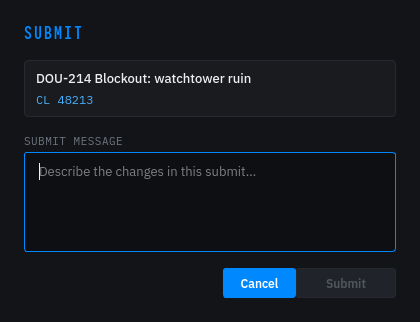
- Submit. Clicking Submit opens a message dialog, then calls
POST /api/vcs/submit, which updates the description (see the callout above) and runsp4 submit -c <CL#>. The response'sfiles_submittedcount comes straight from Perforce's own submit output.
The desktop re-derives whether a task has an open changelist from DousenCore (which keys changelists by issue key), so Submit stays enabled across task-list refreshes and Open CL is idempotent — it returns the existing changelist instead of opening a duplicate. See the equivalent note in Jira tasks.
Automatic workspace from the depot path
Each project has a depot_path set by your admin (e.g. //depot/MyGame/...). During onboarding, the Workspace page's Check button runs p4 -ztag where against that path: if it's already mapped in an existing client, Dousen pre-fills the local root and workspace name from the result (and auto-detects a .uproject inside it for the next onboarding page). If it isn't mapped, a creation form appears — pick a local root and a workspace name (defaulted to <p4user>_<last depot segment>), and Create Workspace generates a client spec and pipes it straight into p4 client -i.
The workspace this creates is always a classic view mapping, even when the depot path lives inside a Perforce stream. Onboarding doesn't ask whether the path is a stream root, so it never writes a Stream: field to the client spec. A classic mapping into a stream path still works in Perforce, but the status bar will show it as (classic) rather than the stream name until you create a true stream client yourself (e.g. p4 client -S //depot/main).
Onboarding does not run a full sync — it only sets up the workspace mapping, and says so on screen ("Workspace created. Sync it from P4V or UnrealGameSync before continuing."). Run your first sync yourself before opening any DCCs.
Streams support
Perforce Streams are detected automatically from p4 info's clientStream field — there is nothing to configure. The DousenDesktop status bar tells you what kind of workspace you're connected to, fetched once right after you sign in:
P4: <stream name>— a stream workspace.P4: <client> (classic)— a classic depot.P4: not connected— offline or not configured.
Each DCC addon's Dousen panel runs the same check locally and shows a compact version right next to your file lock status: Stream: <name> for a stream workspace, or Classic depot otherwise.
File locks inside your DCC
Blender, Maya, 3ds Max, Houdini, Substance Painter, and Substance Designer all show live Perforce status right where you're working, via p4 fstat (P4Python if it's installed, the p4 CLI otherwise). You can checkout (p4 edit), revert (p4 revert), sync (p4 sync), and add (p4 add) — all under your own Perforce identity. Checkout and add target whatever changelist the active Jira task resolves to (falling back to Perforce's default changelist if none is active), which is how a file ends up associated with the right CL without you having to pick one by hand.
Lock status polls roughly every 30 seconds and shows lines such as:
- Locked by <user> (CL n) — someone else has it checked out exclusively.
- Opened by <user(s)> — one or more people have it open without an exclusive lock.
- Locked by you — you have it open.
- Not at latest (have r<n>, head r<m>) — your local copy is behind the depot, with the exact revisions shown.
- Available — free to take.
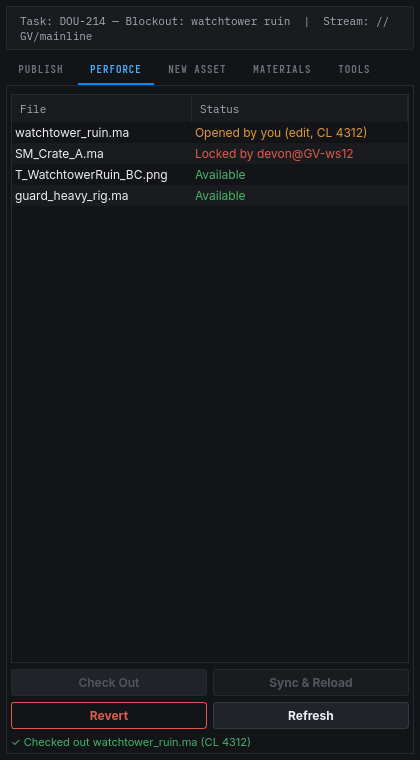
If Perforce can't answer — server unreachable, or the file isn't in the depot at all — the row instead reads P4 error: <detail> or Not in Perforce.
Validated export also runs a pre-export lock check: if a file it needs to write is locked by someone else, the export is blocked before it starts so you don't lose work.
Shelving and unshelving
Perforce lets you shelve a changelist's files on the server without submitting them — handy for handing work to a reviewer or another artist without losing your local edits. GET /api/vcs/shelved?jira_key=... queries Perforce live for shelved changelists (p4 changes -s shelved -l) and keeps only the ones whose description carries the matching [dousen <jira_key>] marker — so it lists changelists Dousen opened for that task, not every shelved CL in the depot. There's no separate database flag that can go stale. The Unshelve button in the My Tasks detail pane calls POST /api/vcs/unshelve, which runs p4 unshelve -s <CL#> -f — the -f clobbers any writable local copy you already have, so it always wins over local edits to the same file.
Preview: shelved-changelist tracking is still being verified end-to-end against a live Perforce server and the desktop UI. The underlying p4 shelve / p4 unshelve plumbing works today, but don't build a hard team workflow around it until it's called out as generally available.
Auto Jira transition on submit
If your project admin has set up a project-level Jira connection and jira.on_submit_transition (a transition name, not a status name), submitting a Dousen changelist moves the linked Jira issue forward automatically — for example, sending it to review the moment you submit. Full details, including the two separate pieces of setup this needs and a known gap in the portal UI: Jira tasks.
Server connection (admin)
The server's connection to Perforce is configured by an administrator with environment variables. Artists never touch these — your personal Perforce identity lives in DousenDesktop.
| Variable | Purpose |
|---|---|
DOUSEN_P4PORT | Perforce server address. |
DOUSEN_P4USER | Service user the server acts as. |
DOUSEN_P4CLIENT | Service workspace used for the server's changelist operations. |
DOUSEN_P4PASSWD | Optional; falls back to the P4 ticket file if unset. |
The server uses a single service workspace for its own changelist operations. Per-artist Perforce identity is handled entirely by DousenDesktop on each artist's machine.