Troubleshooting
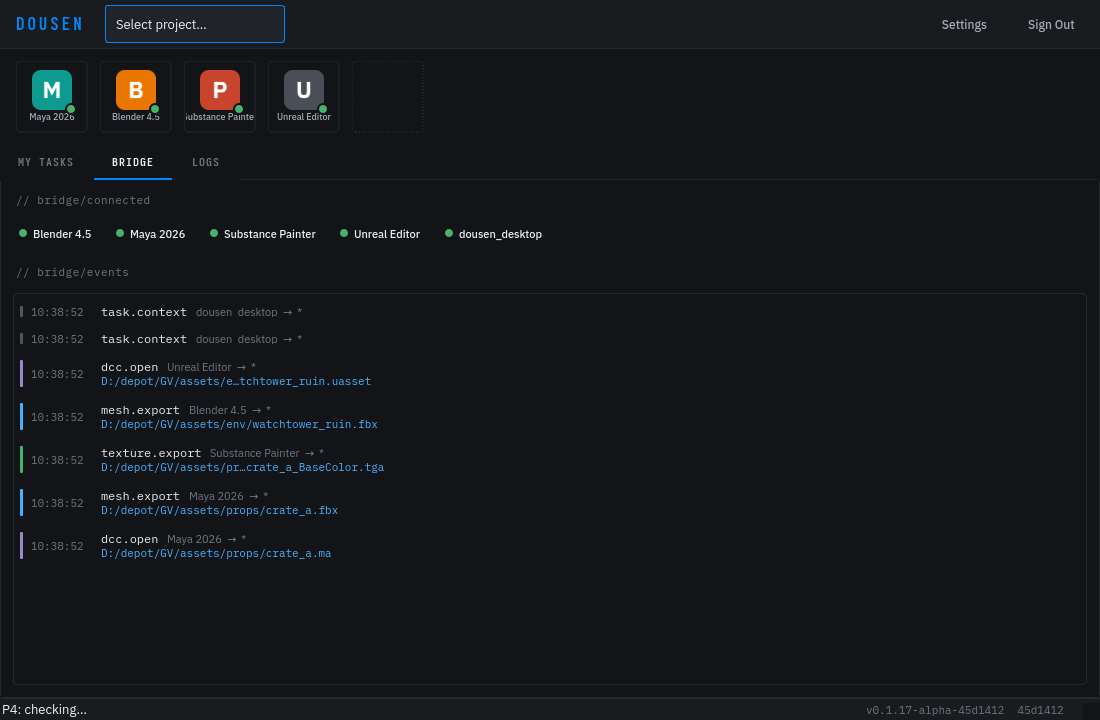
Symptom-first fixes for the problems studios actually hit, grouped by where you see them. Two tools help with almost everything here: the Bridge tab in DousenDesktop (is the app connected? did the event go out?) and the Logs tab (what did Dousen just do?).
Where logs and config live
| What | Where |
|---|---|
| Desktop log | The Logs tab in the main window (also printed to the terminal if launched from one). There is no log file on disk. |
| Desktop config | %APPDATA%\Dousen\DousenDesktop\config.ini on Windows, ~/.config/Dousen/DousenDesktop/config.ini on Linux. |
| Bridge token | bridge.token next to the app data — %APPDATA%\Dousen\DousenDesktop\ (Windows), ~/.local/share/Dousen/DousenDesktop/ (Linux). Regenerated on every DousenDesktop start. |
| Blender addon log | dousen_blender_bootstrap.log in your temp directory — written even when Blender has no console. |
| Other DCC addons | They print [Dousen] … lines to the DCC's own console (Maya Script Editor, MAXScript Listener, Houdini console, Substance log). |
| Unreal plugin | The editor's Output Log under the LogDousenUE category (and the project's Saved/Logs/). |
Set the environment variable DOUSEN_DEBUG=1 before launching a DCC to make the addons print errors they would otherwise swallow. Addons deliberately fail quiet so a pipeline hiccup never blocks an artist — debug mode turns the noise back on.
The Dousen panel doesn't appear in my DCC
- Launch from DousenDesktop, not a desktop shortcut. The addon is injected at launch time; a DCC started on its own has no Dousen panel. See DCC addons.
- Check the executable entry in Settings → DCC Apps. The entry's type must resolve to the real application — for example, pointing Blender's entry at
blender-launcher.exeis handled, but a hand-added entry with an unrecognized id launches the app without any addon. - Read the DCC's console. Maya, 3ds Max, and Houdini print
[Dousen] Failed to load <dcc> addon: <error>on a failed load. Blender's bootstrap prints[Dousen] Failed to register addon: <error>instead, and also writes it todousen_blender_bootstrap.login your temp directory — check that file if Blender was started detached (no console). - Relaunch with
DOUSEN_DEBUG=1if the console shows nothing at all.
On old DousenDesktop builds (pre-fix for DOU-135/136/137), the Maya, 3ds Max, and Blender addons could fail to load with zero console output — no error, no menu, nothing, even with debug logging on. Root cause: the bootstrap script put Dousen's bundled Python path ahead of the DCC's own stdlib on sys.path, so a same-named module (e.g. logging) silently shadowed the real one. The fix switched that to append instead of insert. Current builds go one step further: the addons' own internal logging helper is named _log, not logging, specifically so it can never collide with the stdlib module again. If tools are simply missing with a silent console, update DousenDesktop — this is almost certainly why.
There's no separate "enable the addon" step to check — Dousen doesn't register itself through the DCC's own addon manager (Blender's Preferences → Add-ons, etc.). The panel is injected by the bootstrap script every time DousenDesktop launches the application, so if it's missing, the problem is always in the launch path above, not a toggle you forgot to flip.
Bridge problems
"Bridge not available." when publishing
The addon retries a publish three times with backoff before giving up with this message. In order:
- Is DousenDesktop actually running? The bridge lives inside it — quitting the tray app stops the relay.
- Was DousenDesktop restarted after the DCC was launched? That's fine — the addon re-reads the bridge token on every request — but if the relay port was changed in Settings, running DCCs keep the old port until relaunched.
- Check the Logs tab for
[BridgeRelay] Failed to listen on port 8766. Another program holding the port prevents the relay from starting; change the port under Settings → Connection → Bridge and relaunch your DCCs.
A DCC shows as disconnected even though it's open
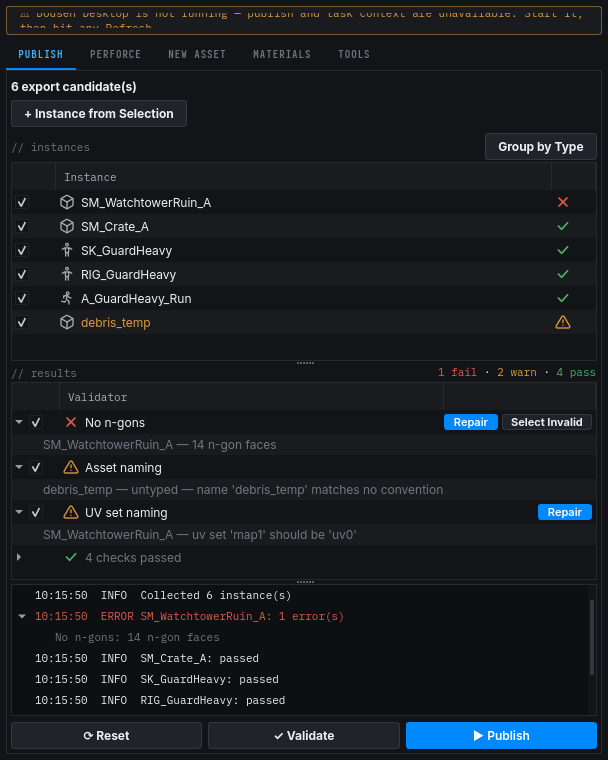
Connected apps must re-announce themselves every 10 seconds; the relay drops anything silent for 30 seconds. A DCC that is frozen (long render, modal dialog blocking its event loop) will drop off the badge and come back on its own. The addons also reconnect automatically with backoff (1 s doubling to 32 s), so a brief relay outage heals itself.
Events published but nothing happens in the receiving app
- Confirm the event reached the relay: it should appear in the Bridge tab event timeline.
- Events carry an optional target — a Send to Painter with Painter closed goes nowhere. Check the receiving app is on the connected list.
- The relay keeps the last 200 events; an app that was closed during a publish won't see it after reopening. Publish again.
A long-running DCC session ignores a convention or setting change
DousenDesktop stamps your current login token into the DOUSEN_TOKEN environment variable at the moment it launches a DCC. The addon's naming-conventions and pipeline-settings clients read that token once and reuse it for every later fetch — they don't ask DousenDesktop for a fresh one. If the token expires while the DCC stays open (a long modeling session, an overnight render), those re-fetches start failing, and — by design, so a pipeline hiccup never blocks an artist — both clients fail open to their last cached response instead of erroring. So if an admin just changed a naming convention or a pipeline setting and it isn't showing up in an already-open DCC, that's expected: relaunch the DCC from DousenDesktop to pick up a fresh token and a fresh fetch.
Writing a custom tool against the bridge instead of using an addon? A plain browser fetch()/XHR request always gets a 403 — the relay rejects any request that carries an Origin header at all, by design. Use a non-browser HTTP client and read the bearer token from bridge.token fresh on every request rather than caching it. Full protocol, headers, and a worked Python example: Bridge API.
Working offline
DousenDesktop queues a narrow class of operations when the server is unreachable — today that's source-asset metadata upserts (what an artist published from a DCC), not changelist open/submit, which still need a live connection. Queued items sit on disk and flush automatically once the server answers again; anything the server rejects outright (a 4xx) is dropped rather than retried forever.
This queue is implemented and running in current builds, but the underlying ticket (DOU-91) is still in review — treat it as best-effort, not a guaranteed offline mode. Don't assume every action is safe mid-outage: changelist operations and full Jira sync still require connectivity.
The same grace-period idea used for licensing also bounds how long the queue keeps accepting new work while offline — reconnect before that window closes if you can.
Validation and export problems
The full rule reference, admin configuration, and a worked walkthrough live on the Asset validation page — this is the short version for when Export & Notify is refusing to cooperate.
| Message | Cause | Fix |
|---|---|---|
| "Run validation before exporting." | Export was clicked without running the checks first. | Click Run Validation in the Dousen panel, then export. |
| "Fix N validation error(s) before exporting." | At least one error-severity rule failed. Errors always block export — there's no override. | Open the results list, find the failing rule, and click its Fix button if it has one; otherwise fix the object by hand and re-run validation. Look up what the rule actually checks in the validator reference. |
| "N warning(s) found. Export anyway?" | Only warning-severity rules failed. | Choose Yes to export anyway, or No to go back and address it first — nothing is exported on No. |
| A rule is stricter (or looser, or missing) compared to what you remember | Your project's naming convention can enable a rule the baseline ships off, flip a warning to an error, or tighten a parameter (a lower triangle budget, a smaller texture ceiling). | Ask your admin, or have them check the effective rule set in the project's Validators tab in the web portal. |
Every run is logged to DousenCore whether or not the export actually happens, so an admin can see exactly what an artist hit without asking — see validation history. See also DCC addons: validation before export for how this looks inside each application.
Jira problems
| Symptom | Fix |
|---|---|
| "Jira sign-in failed — check your Jira email and API token in Settings." | Jira rejected your credentials (401/403). Re-enter the account email and a fresh API token from your Atlassian account, then use Test Connection in Settings → Jira. Polling resumes once the test passes. |
| "Offline — can't reach Jira…" banner | Network problem, not credentials — wrong base URL, VPN, or no connectivity. Polling backs off (60 s, then 5 min) and recovers by itself when Jira is reachable again. |
| "✗ Fill in all Jira fields first" in the test dialog | Base URL, email, and token are all required. The base URL is your full Jira Cloud site, e.g. https://yourstudio.atlassian.net. |
| Task list is empty but you have work assigned | My Tasks only shows issues assigned to you that are not in a Done status category. Check the assignee on the issues in Jira. |
Sign-in and session problems
"Session active on another device. Please log in again."
Dousen allows one active device per account. Signing in on a second machine ends the first session — this notification means another sign-in (yours or someone using your account) took over. The cutover isn't instant: the old device keeps working until its next 60-second heartbeat or token refresh notices the mismatch, so there can be up to a minute of overlap before it shows this message. Sign in again to reclaim the session; if you didn't sign in elsewhere, tell your admin.
"Session expired. Please sign in again."
The background token refresh failed — usually after a long offline period or a server-side sign-out. Signing in again fixes it. If it repeats immediately, the server may be unreachable: use Test Connection under Settings → Connection.
Browser sign-in never finishes
Sign in with Browser opens your system browser to a one-time OAuth (PKCE) flow and starts a local callback listener on an OS-assigned loopback port to catch the redirect. If the tab is closed, the flow is abandoned, or nothing comes back, DousenDesktop gives up after 5 minutes with "Sign-in timed out. Please try again." — no port is left open in the background afterward, so it's safe to just click the button again. If the browser tab itself shows "Login failed", the authorize step was rejected on the server side (try again from DousenDesktop rather than reloading the browser tab).
The first-run setup wizard (server, Jira, Perforce workspace, UE project, DCC discovery) only appears automatically on a fresh install — once it completes, DousenDesktop remembers that in its config and skips it on every later launch. To reconfigure a machine from scratch without reinstalling, use the Re-run Setup link on the sign-in screen (see Desktop app) rather than hunting for config files to delete.
Auto-update problems
| Message | What it means |
|---|---|
| "SHA-256 checksum mismatch — download may be corrupted" | The downloaded installer doesn't match the published hash. The update is refused outright and your current DousenDesktop keeps running untouched. Click Retry; if it keeps failing, a proxy or CDN cache may be serving a bad copy — download the installer manually instead. |
| "Update signature verification failed — the installer is not signed by Dousen. Refusing to install." | The package's signature doesn't check out. Never bypass this — it means the download was tampered with or came from an untrusted mirror. Get the installer from the official release channel. |
| "Manifest missing sha256 — refusing unsigned update" (or no signing key configured) | The update manifest itself is malformed or unsigned — a server-side release problem, not your machine. Report it; DousenDesktop refuses to install rather than guess. |
In every failure case the dialog shows a red "✗ Download failed: …" status with a Retry button, and the version you're currently running is never touched — a failed update never leaves you on a broken install.
Perforce problems
| Symptom | Fix |
|---|---|
| "Failed to start p4. Is it installed and on PATH?" | DousenDesktop's onboarding and workspace-creation dialogs always shell out to the p4 command line directly. Install the Helix command-line client and make sure p4 resolves in a terminal. |
| "P4: not connected" in the status bar | The configured P4 server is unreachable or the workspace is wrong. Check the project's P4 server/workspace under Settings → Projects. |
| "Workspace creation failed: …" | The message contains p4's own error — most often a bad depot path or a workspace name that already exists on another host. Fix the field it names and retry; you can also create the workspace in P4V and re-run the check. |
| Export blocked: "<file>: locked by <user> (CL n)" | Not an error — someone else has the file checked out, and the pre-export lock check refuses to overwrite their work. Coordinate with them or wait for their submit. |
| Files missing after onboarding created a workspace | By design, workspace creation does not sync. Sync from P4V or UnrealGameSync before working. |
| Status bar shows "P4: <stream>" instead of "(classic)" | Informational, not an error — the project's workspace is stream-based rather than a classic client view. Hover it to see the stream name and server; use it to confirm you're on the stream you expect. |
Inside a DCC, lock/checkout/CL features prefer P4Python when it's importable in that DCC's own Python, and fall back to the p4 CLI automatically otherwise — that fallback is silent and has no user-visible difference. If neither is available, those calls just return nothing rather than erroring, so lock status can go quiet without a message; check Perforce if lock icons stop updating.
Unreal Engine problems
Full plugin architecture, config reference, and the material-catalog/Nanite integration are on the Unreal Engine page. The short version:
- Assets don't auto-reimport. Check, in order:
bAutoReimportOnBridgeEventistrue; DousenDesktop is running (the plugin polls its relay); and the Output Log forLogDousenUEwarnings. "Bridge relay unreachable (failure #n)" means the desktop app isn't running or the relay port doesn't matchBridgeRelayPort. - No naming-convention checks and imports land in odd paths.
ProjectIdis empty inConfig/BaseDousenUE.ini— conventions are skipped entirely until it's set to the project's UUID. - Unreal missing from "Send to Unreal" lists. The editor must be open with the plugin loaded to appear as a connected DCC. With the editor closed, enable headless import in DousenDesktop (Settings → Unreal) so publishes still land — see headless import.
Server problems (self-hosted admins)
| Symptom | Fix |
|---|---|
| Server exits at startup: "license validation failed" | The license token is malformed or doesn't match the public key. Re-paste DOUSEN_LICENSE_KEY and DOUSEN_LICENSE_PUBLIC_KEY_PEM exactly as issued. |
| Startup log: "LICENSE EXPIRED — operating in grace period…" | The license expired but the server is still inside its 14-day grace window, so it starts normally and logs how many days remain each time it starts. There's no in-app countdown — watch the startup logs (or your log aggregator) and renew before the window closes. |
| Server exits: "license expired and grace period has ended" | The 14-day grace window closed with no renewal, so the server now refuses to start. Get a fresh DOUSEN_LICENSE_KEY from the billing portal and restart. |
| Creating a user fails: "Seat limit reached (n/n)…" | Every seat is in use. Free a seat or raise the plan's seat count, then retry. See User & auth management. |
| "Send reset" shows amber "SMTP not configured — link logged to server output" | No mail server is configured, so Dousen can't email the link — the reset itself still succeeds, and the reset URL is written to the server's log output instead. Find it in the logs and hand it to the user, or configure SMTP for automatic delivery. |
| Jira webhook returns 401 | The signature didn't verify — the secret configured in Jira's webhook doesn't match DOUSEN_WEBHOOK_SECRET on the server. Re-copy the secret on both sides. |
| Jira webhook returns 503 | DOUSEN_WEBHOOK_SECRET isn't set, so the server refuses unsigned webhooks by default. Set the secret (dev-only escape hatch: DOUSEN_ALLOW_INSECURE_WEBHOOK=true — never in production). |
Still stuck? Grab the relevant log (Logs tab, DCC console, or LogDousenUE output) and contact support — a log line almost always identifies the failure faster than a description of it.