Asset validation
Validators are automatic checks that run inside the DCC before an asset is exported. They catch naming, format, and technical problems — a mesh named off-convention, a non-watertight surface, an oversized texture, a vertex skinned to too many bones — at the point where they are cheapest to fix: before the file ever reaches Perforce, let alone Unreal. The Unreal Engine plugin additionally validates names on its side, as a second line of defense.
As an admin you decide which rules run, at what severity, and with what parameters; artists run the checks at export time and act on the results. Editing the rule set is admin-gated.
This page is both a concept guide and a full reference. If you just want to look up a rule, jump to the validator reference.
Anatomy of a validator
Every validator — built-in or custom — is the same shape. It is a small class with a fixed set of metadata fields and one method that does the checking:
| Field | Meaning |
|---|---|
| rule_id | Stable identifier, dotted and namespaced by area — mesh.watertight, naming.convention, texture.max_resolution. This is what a convention references when it turns a rule on. |
| name | Human-readable summary shown in the portal picker and the in-DCC results list. |
| category | Grouping used to organize the picker and to drive the Nanite / NonNanite gate — e.g. Mesh, Rig, Nanite. |
| severity | Default outcome when it fails: error blocks the export; warning is advisory and the artist can continue. A convention can override this per project. |
| enabled | Whether the rule is on out of the box. The baseline ships some rules off (stricter or studio-specific ones) so a default project isn't over-constrained. |
| asset_types | Which asset types the rule is relevant to (static_mesh, skeletal_mesh, animation_sequence, texture, hda, vat). Empty means it applies to any type. |
| params | Typed, admin-editable knobs — each a {key, type, default, label} (type is int, float, bool, string, or list). max_tris = 50000, target_fps = 30, and so on. |
The check itself returns four things: whether it passed, a human message ("Exceeds limit of 50,000 tris"), the list of affected objects (so the panel can point at exactly what's wrong), and an optional auto-fix — a function the artist can invoke from a Fix button to correct the problem and re-run. Rules that can't be safely auto-fixed simply omit it.
"On by default" and "error by default" describe the baseline. The final rule set for a project is whatever its convention resolves to — a convention can enable a rule the baseline ships off, flip a warning to an error, or tighten a parameter. The defaults in the tables below are the starting point, not the last word.
Where rules come from and how they are scoped
Validators live in the project's naming-conventions document. You can attach a rule at three places, and they cascade downward:
- Global — every asset in the project.
- Asset type — every asset of one type.
- Taxonomy node — any node in the arbitrary-depth tree, applying to that node and everything beneath it.
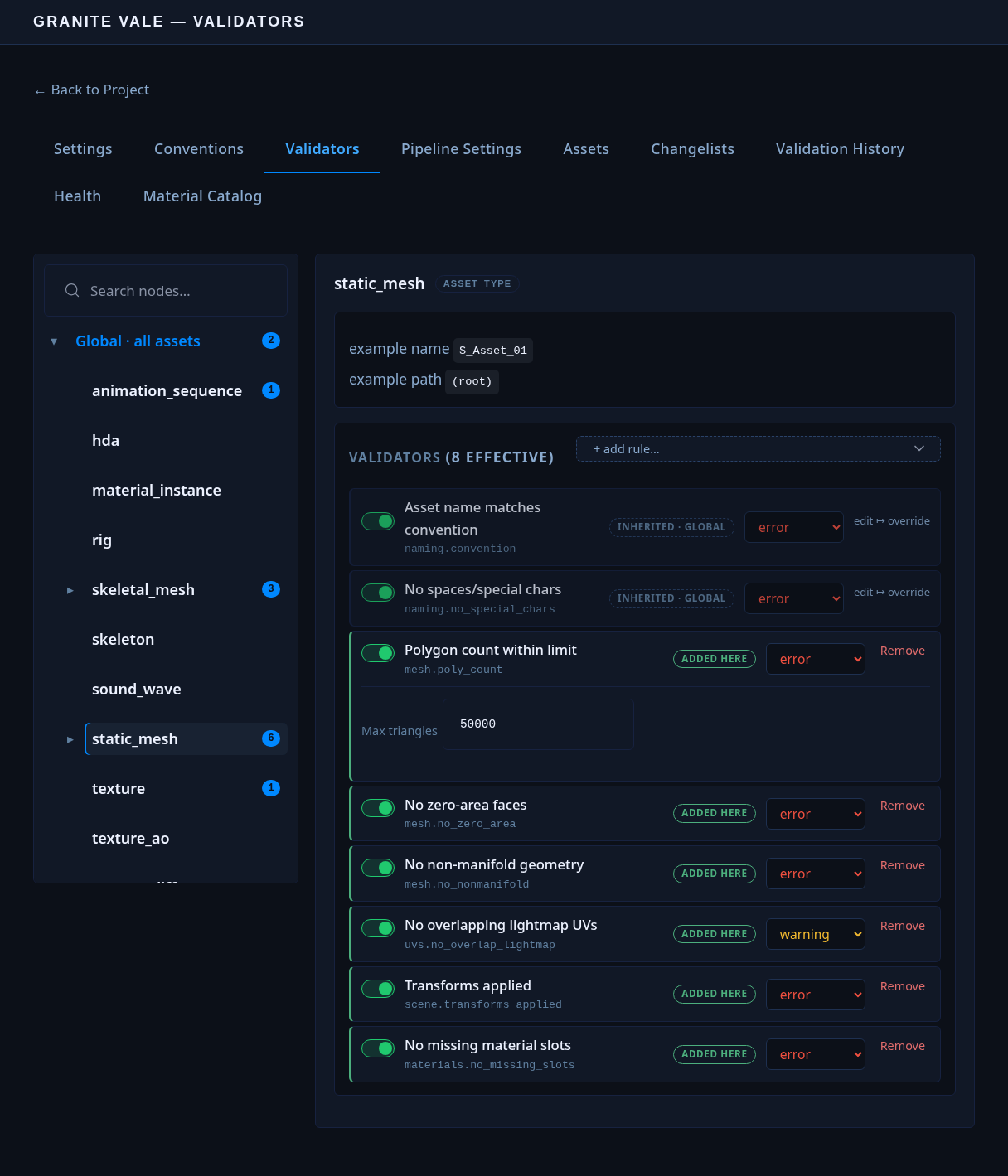
Deeper levels override matching parameters from shallower ones, so a node can tighten a global rule (for example, a stricter texture limit for hero props). DousenCore resolves the effective rule set for every node ahead of time and bakes it into the compiled conventions; clients simply use the deepest matching set.
Texture size limits are validator rules — texture.max_resolution and texture.resolution_power_of_2 — configured in the Validators tab, not in a separate texture setting.
The validator catalog
The catalog — the set of rules the portal picker can offer — is a two-layer system, not a single list:
- A compiled baseline. DousenCore ships with a built-in set of rules (naming, mesh, textures, rig, animation, and more) compiled into the server itself. This is the last-resort backstop if a project has never reported anything else.
- A plugin-derived layer, reported per DCC. Each DCC addon (Blender, Maya, 3ds Max, Houdini, Substance Painter/Designer, …) registers its own validator classes locally. On startup — or whenever asked — the addon walks that local registry, including any custom plugins dropped in
validators.extra_paths(below), and reports the resulting list to DousenCore.
DousenCore merges the reported layer over the compiled baseline, per tenant. A rule a DCC reports that the baseline doesn't have becomes a first-class catalog entry, complete with typed parameter inputs in the portal's rule picker; a rule a DCC also has natively overrides the baseline's copy. The merged result is what the portal's rule picker renders, and what a DCC falls back to building its own rule set from if compiled conventions aren't reachable. Because the metadata comes straight from the plugin classes, a custom validator you drop in is exactly as first-class as a built-in.
| Endpoint | Purpose |
|---|---|
| GET /api/validator-catalog | The merged catalog (baseline + reported layer) of available rules and their parameters, used by the portal's rule picker. |
| POST /api/validator-catalog | A DCC addon reports its locally-derived rule list for the tenant. Called by the addon itself, not something an admin calls directly. |
Validator reference
Every built-in rule, grouped by category. Columns: the rule_id; its default severity · state (error/warning, on/off out of the box); the asset types it applies to; its parameters with baseline defaults; and what it actually checks.
Naming
The one category that runs everywhere — every mesh-authoring and texturing host reports it. Names are checked against the project's compiled convention templates.
| Rule | Default | Applies to | Parameters | Checks |
|---|---|---|---|---|
| naming.convention | error · on | any | — | Object and file names begin with the asset-type prefix from the project convention (e.g. SM_ for a static mesh). Fails if the scene is unsaved, or if the filename still contains an unresolved {placeholder}. |
| naming.no_special_chars | error · on | any | — | Names contain only letters, digits, _ and - — no spaces or punctuation. (Maya additionally tolerates its | and : path separators.) |
Mesh — general hygiene
Always-applicable geometry checks, independent of the rendering pipeline. The triangle cap here is a generous sanity ceiling; the tighter, pipeline-specific budgets live in the Nanite and NonNanite categories.
| Rule | Default | Applies to | Parameters | Checks |
|---|---|---|---|---|
| mesh.poly_count | error · on | static_mesh, skeletal_mesh | max_tris = 50000 | Triangle count per mesh is at or below the cap. |
| mesh.no_ngons | warning · off | static_mesh, skeletal_mesh | — | No faces with five or more sides. |
| mesh.no_zero_area | error · on | static_mesh, skeletal_mesh | — | No degenerate faces with zero surface area. |
| mesh.no_nonmanifold | error · on | static_mesh, skeletal_mesh | — | No non-manifold edges (an edge shared by more than two faces, etc.). |
Nanite — dynamic pipeline
Hygiene and density checks for meshes going through UE5's Nanite/Lumen pipeline. Nanite virtualizes geometry (no authored LODs) but demands clean meshes: open edges, flipped normals, floating geometry and slivers show up as pink/red in the Nanite viewport and break Lumen tracing. These run only when the asset's assigned materials allow Nanite — see the Nanite gate below.
| Rule | Default | Applies to | Parameters | Checks |
|---|---|---|---|---|
| mesh.watertight | error · on | static_mesh | — | Every edge borders exactly two faces — no open boundary edges. Holes render as missing triangles under Nanite and leak light under Lumen. |
| mesh.consistent_normals | error · on | static_mesh, skeletal_mesh | — | No flipped or inconsistently-wound faces (detected from edge winding). Flipped faces read as pink in the Nanite viewport. |
| mesh.no_sliver_triangles | warning · on | static_mesh, skeletal_mesh | min_angle_deg = 5.0 | No near-degenerate thin triangles — flags any triangle whose smallest corner angle is below the threshold. |
| mesh.no_loose_geometry | error · on | static_mesh, skeletal_mesh | — | No loose vertices or wire edges that aren't part of any face — Nanite can't cluster them. |
| nanite.min_triangles | warning · on | static_mesh | min_tris = 1000 | Mesh is dense enough that Nanite's fixed per-mesh overhead pays off; below this a traditional mesh is cheaper. |
| nanite.tri_vert_ratio | warning · on | static_mesh | max_vert_ratio = 0.6 | Vertex-to-triangle ratio stays efficient. Excess vertices signal UV/normal seams that split geometry and hurt Nanite clustering (guide target ≈ 0.5–0.6). |
| uvs.min_coverage | warning · on | static_mesh | min_coverage = 0.65 | UV0 islands fill at least this fraction of the 0–1 space (texel-density efficiency). A mesh with no UVs fails. |
NonNanite — traditional pipeline
The counterpart set: when an asset's materials disallow Nanite, these run instead. They encode the traditional baked-LOD budget — a tighter triangle cap, an authored-LOD-chain requirement, a lightmap UV channel, and an overdraw/culling proxy.
| Rule | Default | Applies to | Parameters | Checks |
|---|---|---|---|---|
| nonnanite.max_triangles | warning · on | static_mesh | max_tris = 60000 | A tighter per-mesh triangle budget than the always-on mesh.poly_count — a rasterized mesh is far more cost-sensitive per triangle than a Nanite one. |
| nonnanite.lod_chain | warning · on | static_mesh | min_lods = 1, tris_threshold = 20000 | Meshes above the tri threshold have at least min_lods authored LOD siblings, detected by naming: <base>_LOD1, _LOD2, … Below the threshold, no LODs are required. |
| nonnanite.lightmap_uvs | warning · on | static_mesh | — | A second UV channel (UV1) exists, reserved for the baked lightmap. |
| nonnanite.max_bounds_ratio | warning · on | static_mesh | max_extent = 50 (m), dense_tris = 100000 | Flags meshes that are both large (bounding-box diagonal over max_extent, normalized to meters regardless of scene units) and dense (over dense_tris). Either condition alone is fine; only the combination culls poorly without Nanite. |
UVs
| Rule | Default | Applies to | Parameters | Checks |
|---|---|---|---|---|
| uvs.in_range | warning · off | static_mesh, skeletal_mesh | — | UV islands stay within the 0–1 tile. |
| uvs.no_overlap_lightmap | warning · on | static_mesh | — | No overlapping UVs in the lightmap channel (overlaps bake as light bleed). |
Scene
| Rule | Default | Applies to | Parameters | Checks |
|---|---|---|---|---|
| scene.transforms_applied | error · on | static_mesh, skeletal_mesh | — | Object scale and rotation are frozen (applied), not left on the transform where UE would import them wrong. |
| scene.no_hidden_objects | warning · on | static_mesh, skeletal_mesh, animation_sequence | — | No hidden objects lurking in the scene that would export unexpectedly. |
| scene.single_root_skeletal | error · off | skeletal_mesh | — | A skeletal mesh has exactly one root object. |
| scene.no_loose_vertices | error · on | static_mesh, skeletal_mesh | — | No stray loose vertices in the scene. |
Materials
| Rule | Default | Applies to | Parameters | Checks |
|---|---|---|---|---|
| materials.no_missing_slots | error · on | static_mesh, skeletal_mesh | — | No empty or unlinked material slots on the mesh. |
| materials.expected_count | warning · off | static_mesh, skeletal_mesh | max_materials = 3 | Material count per mesh stays within the convention. |
| materials.no_empty_texture_sets | warning · on | texture | — | No texture sets left empty (Substance Painter). |
Rig
| Rule | Default | Applies to | Parameters | Checks |
|---|---|---|---|---|
| rig.bone_naming | warning · on | skeletal_mesh | pattern = ^[a-z][a-z0-9_]*(\.[LR]|_[lr])?$ | Bone names match the regex (lowercase, optional L/R side suffix). |
| rig.hierarchy | error · on | skeletal_mesh | check_symmetry = false | Skeleton hierarchy is clean; optionally verifies left/right symmetry. |
| rig.bone_count | warning · on | skeletal_mesh | max_bones = 256 | Bone count within the engine/project limit. |
| rig.max_influences | error · on | skeletal_mesh | max_influences = 4 | No vertex is skinned to more than N bones. |
| rig.unweighted_vertices | error · on | skeletal_mesh | — | Every vertex has at least one skin weight. |
| rig.root_at_origin | error · on | skeletal_mesh | — | The root bone sits at the world origin. |
| rig.bind_pose | warning · off | skeletal_mesh | — | Skeleton is in bind pose, with no leftover rotations. |
| rig.no_negative_scale | error · on | skeletal_mesh | — | No bones with negative scale (which flips winding downstream). |
Animation
| Rule | Default | Applies to | Parameters | Checks |
|---|---|---|---|---|
| anim.frame_range | error · on | animation_sequence | — | The clip has keyframes and a valid frame range. |
| anim.fps_match | error · on | animation_sequence | target_fps = 30 | Scene FPS matches the project target. |
| anim.root_motion | warning · off | animation_sequence | expect_stationary = false, root_bone = root | Root motion is intentional — flags a moving root when the clip is meant to be stationary, or vice versa. |
| anim.no_keys_on_frame_zero | warning · on | animation_sequence | — | No keyframes on frame 0 — Unreal expects the range to start at 1. |
| anim.no_scale_keys | warning · on | animation_sequence | allow_root_scale = false, root_bone = root | No scale keyframes on bones (optionally allowing them on the root). |
| anim.bone_count_match | error · off | animation_sequence | expected_bone_count = 0 | Animated bone count matches the target skeleton (0 = accept any). |
Textures
| Rule | Default | Applies to | Parameters | Checks |
|---|---|---|---|---|
| texture.resolution_power_of_2 | error · on | texture | — | Both dimensions are powers of two. |
| texture.max_resolution | warning · on | texture | max_resolution = 4096 | Resolution is within the ceiling. |
| texture.channel_completeness | error · on | texture | required_channels = [BaseColor, Normal, Roughness] | Every required channel is present in the export set. |
| texture.channel_gamma | error · on | texture | — | Correct color space per channel — sRGB for color, linear for data (normal, roughness, …). |
Houdini — HDA & VAT
| Rule | Default | Applies to | Parameters | Checks |
|---|---|---|---|---|
| hda.has_definition | error · on | hda | — | The selected node is a valid HDA with a definition. |
| hda.version_set | warning · on | hda | — | The HDA carries a version string. |
| hda.has_description | warning · on | hda | — | The HDA has a user-facing description. |
| vat.resolution_power_of_2 | error · on | vat | — | The VAT texture resolution is a power of two. |
| vat.output_files_exist | error · on | vat | expected_outputs = [posmap, normalmap, geo_output] | Every configured VAT output is present. |
Host-specific rules
Some addons ship checks shaped to their host that aren't part of the shared baseline. They report themselves into the catalog on startup exactly like a custom plugin, so they show up in the picker with typed parameters — but they only exist where that host does. A non-exhaustive sample:
| Host | Rules |
|---|---|
| 3ds Max | scene.units (centimetres), scene.frame_rate, scene.no_unused_layers, rig.frozen_transforms, rig.no_bone_scale, animation.range, animation.no_redundant_keys, uvs.has_uvs, uvs.no_overlapping, materials.naming, materials.no_missing |
| Substance Designer | graph.output_completeness, graph.resolution_power_of_2 (max_resolution = 4096, require_square = true), graph.no_unconnected_nodes |
DCC coverage
Not every host runs every category — it runs the checks that make sense for the assets it produces. Blender, Maya and 3ds Max are the full mesh-authoring set; the specialised tools cover their own domain. Naming is the one category every host reports.
| Category | Blender | Maya | 3ds Max | Painter | Designer | Houdini |
|---|---|---|---|---|---|---|
| Naming | ✓ | ✓ | ✓ | ✓ | ✓ | ✓ |
| Mesh hygiene | ✓ | ✓ | ✓ | — | — | — |
| Nanite | ✓ | ✓ | ✓ | — | — | — |
| NonNanite | ✓ | ✓ | ✓ | — | — | — |
| UVs | ✓ | ✓ | ✓* | — | — | — |
| Scene | ✓ | ✓ | ✓* | — | — | — |
| Materials | ✓ | ✓ | ✓* | ✓ | — | — |
| Rig | ✓ | ✓ | ✓* | — | — | — |
| Animation | ✓ | ✓ | ✓* | — | — | — |
| Textures | — | — | — | ✓ | — | — |
| Graph | — | — | — | — | ✓ | — |
| HDA / VAT | — | — | — | — | — | ✓ |
3ds Max shares the same baseline rule ids as Blender and Maya for naming, mesh hygiene, Nanite and NonNanite. In the ✓* categories it instead ships host-shaped rules under its own ids (see host-specific rules) — scene.units rather than scene.transforms_applied, uvs.no_overlapping rather than uvs.no_overlap_lightmap, and so on — so the category is covered but the exact rule set differs. The Unreal plugin separately re-validates asset names on import, as a second line of defense.
The Nanite / NonNanite gate
The Nanite and NonNanite categories are mutually exclusive per asset. Which one runs is resolved automatically from the asset's material assignment in the project's material catalog: if every material assigned to the mesh allows Nanite, the NonNanite category is dropped and only the (looser) Nanite checks run; if any assigned material disallows it, the reverse happens. An asset with no resolvable material assignment defaults to the Nanite set, since those are the original hygiene checks the category split was carved out of.
This is one half of a single Nanite gate that spans DCC and engine: on export the DCC decides which density checks apply from the material-catalog lookup, and on import FAssetSyncManager in the Unreal plugin sets the mesh's NaniteSettings.bEnabled from that same resolution — so the checks an artist saw at export time match the setting the mesh actually lands with.
The material-catalog-driven Nanite gate is implemented and code-complete, but still awaiting a full workstation end-to-end pass before it's considered production-hardened. Expect category boundaries and edge-case behavior (unassigned materials, mixed assignments) to be refined.
Writing a custom validator
Admins can add their own checks by writing a Python validator plugin and pointing the project at the folder that contains it. Set the validators.extra_paths pipeline setting; each entry may be:
- a Perforce depot path such as
//depot/tools/validators, - a path relative to the source root, or
- an absolute path.
A validator is a class that subclasses ValidatorPlugin, sets the same metadata fields the built-ins use (so it appears in the portal picker with typed parameter inputs), and implements one method, validate(). Register it with the @register_plugin decorator. Everything below is imported from dousen.validators:
| Import | Role |
|---|---|
| ValidatorPlugin | The base class you subclass. |
| register_plugin | Decorator that adds your class to the registry so it's discovered and reported to the catalog. |
| CheckResult | The return type — a type alias for (bool, str, list[str], Callable | None). Optional, for the annotation. |
validate(self, context, params) must return a 4-tuple, and this is the whole contract:
- passed (
bool) —Truemeans the check passed;Falseis how you fail it. Whether a failure surfaces as an error (blocks export) or a warning (advisory) is decided by the rule'sseveritymetadata, not byvalidate()— you just report pass/fail. - message (
str) — a human explanation shown next to the result on failure;""on pass. - affected_objects (
list[str]) — the specific object/face names that failed, so the panel can point at them;[]on pass. - fix_fn (
Callable | None) — an optional zero-argument function that corrects the problem. Return it to make the panel render a Fix button that runs it and re-validates; returnNonewhen there's no safe automatic fix.
Import DCC modules inside validate() (and inside the fix), never at module top — the class is imported in every host, but its host-native API (bpy, bmesh, pymxs, Maya cmds, …) only exists in the hosts you list in hosts. The first argument is that host's native context object; params is the resolved, admin-configured parameter dict for this asset — read your own keys out of it with their defaults.
PYTHON — a Blender custom validator, with an auto-fixfrom dousen.validators import ValidatorPlugin, CheckResult, register_plugin


@register_plugin
class NoNgonsValidator(ValidatorPlugin):
    rule_id     = "mesh.no_ngons_custom"   # unique, dotted, namespaced
    name        = "No ngon faces"          # shown in the picker + results list
    category    = "Mesh"                   # groups it in the picker
    hosts       = ["blender"]              # which DCCs load it; ["any"] = all
    severity    = "warning"                # default fail level; a convention may override
    enabled     = True                     # on out of the box
    asset_types = ["static_mesh"]          # [] = any type
    params      = [
        {"key": "max_sides", "type": "int", "default": 4, "label": "Max sides"},
    ]

    def validate(self, bpy_context, params) -> CheckResult:
        import bmesh  # DCC import stays inside validate()

        limit = int(params.get("max_sides", 4))
        offenders = []
        for obj in bpy_context.scene.objects:
            if obj.type != "MESH":
                continue
            bm = bmesh.new()
            bm.from_mesh(obj.data)
            ngons = sum(1 for f in bm.faces if len(f.verts) > limit)
            bm.free()
            if ngons:
                offenders.append(f"{obj.name} ({ngons} ngons)")

        if offenders:
            # An auto-fix: triangulate the offending meshes on demand.
            def _fix():
                import bmesh
                for obj in bpy_context.scene.objects:
                    if obj.type != "MESH":
                        continue
                    bm = bmesh.new()
                    bm.from_mesh(obj.data)
                    bmesh.ops.triangulate(bm, faces=bm.faces)
                    bm.to_mesh(obj.data)
                    bm.free()

            return False, f"{len(offenders)} mesh(es) contain ngons", offenders, _fix

        return True, "", [], None   # passed: empty message, no offenders, no fix
If a check can't be auto-fixed safely, return None as the fourth element and the artist fixes it by hand, then re-runs — exactly like the built-in naming checks.
Keep custom validators in Perforce (a //depot/... entry) so every artist gets the same checks the moment they sync — no per-machine setup. On startup each addon walks the discovered paths and reports the plugins it finds to the catalog, so a new rule shows up in the portal picker for admins too.
Sharing one check across several DCCs
The validator above is fully self-contained — it does its own measuring and its own pass/fail decision. That's the right shape for a one-host check. But many rules are conceptually identical everywhere and differ only in how you read the data out of the host: "count triangles, compare to max_tris" is the same logic in Blender, Maya and 3ds Max — only the API call that counts triangles changes.
For those, Dousen's built-ins use a two-layer split (the classic template-method pattern), and custom validators can too. A DCC-agnostic base class owns the metadata and writes validate() once — the comparison, the offender formatting, the 4-tuple. It leaves a single data hook abstract. Each per-DCC subclass then overrides only that hook to return raw measured data, and sets hosts. It never touches the 4-tuple.
This is exactly why the same rule_id (e.g. mesh.poly_count) appears identically across Blender, Maya and 3ds Max in the coverage matrix: one base, one validate(), three different data-fetch bodies.
PYTHON — the base owns validate(); it calls an abstract hookclass BasePolyCountValidator(ValidatorPlugin):
    rule_id     = "mesh.poly_count"        # metadata lives on the base
    name        = "Polygon count within project limit"
    category    = "Mesh"
    severity    = "error"
    asset_types = ["static_mesh", "skeletal_mesh"]

    def get_mesh_tri_counts(self, context, params):
        """DCC-specific hook — subclass returns [(name, tri_count), ...]."""
        raise NotImplementedError

    def validate(self, context, params) -> CheckResult:
        max_tris = int(params.get("max_tris", 50000))
        offenders = []
        for name, tris in self.get_mesh_tri_counts(context, params):   # ← calls the hook
            if tris > max_tris:
                offenders.append(f"{name} ({tris:,} tris)")
        if offenders:
            return False, f"Exceeds limit of {max_tris:,} tris", offenders, None
        return True, "", [], None          # ← the 4-tuple is assembled here, once
PYTHON — the Maya subclass overrides only the data hook@register_plugin
class MayaPolyCountValidator(BasePolyCountValidator):
    hosts = ["maya"]                       # the only metadata it adds

    def get_mesh_tri_counts(self, context, params):
        import maya.cmds as cmds           # host import stays inside the hook
        return [
            (t, cmds.polyEvaluate(t, triangle=True))
            for t in _mesh_transforms()
        ]                                  # returns raw data — NOT the 4-tuple
At run time the runner calls MayaPolyCountValidator.validate(); because the subclass doesn't override it, that resolves to BasePolyCountValidator.validate(), which calls Maya's get_mesh_tri_counts() for the raw counts, applies the max_tris comparison, and returns the tuple. The subclass looks like it "returns a single value" only because the tuple is built one class up the chain — the contract is unchanged.
Each base class defines its own hook, shaped to what that check needs:
| Base class | Abstract hook | Subclass returns |
|---|---|---|
| BasePolyCountValidator | get_mesh_tri_counts | [(name, tris)] |
| BaseWatertightValidator | get_mesh_boundary_edge_counts | [(name, open_edge_count)] |
| BaseConsistentNormalsValidator | get_mesh_face_loops | [(name, [face_vert_indices])] |
| BaseNoSliverTrianglesValidator | get_mesh_triangles | [(name, [(p0, p1, p2)])] |
| BaseNonNaniteMaxBoundsRatioValidator | get_mesh_bounds_and_tris (+ scene_unit_scale) | [(name, bbox_min, bbox_max, tris)] |
Which style to use? If your check is one-host, or the "measure" and "decide" steps are naturally intertwined, subclass ValidatorPlugin directly and return the 4-tuple — it's less indirection. If the exact same decision logic needs to run across two or more DCCs, write a base with an abstract data hook and a thin subclass per host — you write the comparison once and can't let the hosts drift out of agreement.
Both styles produce ordinary ValidatorPlugin subclasses and are reported to the catalog identically — the split is purely a code-reuse convenience, invisible to admins in the portal and to artists in the DCC.
Validation history and project health
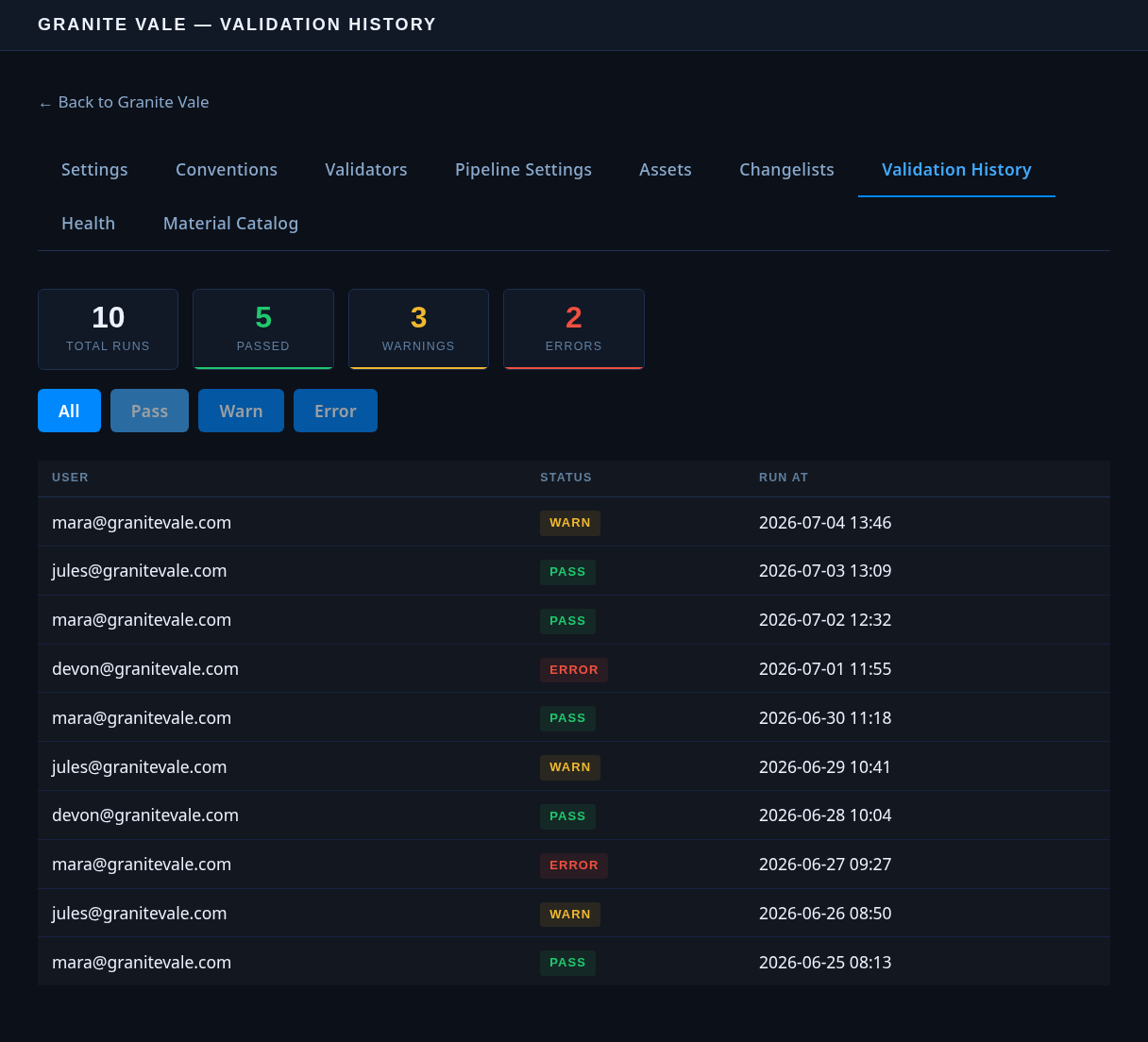
Every check an artist runs — pass, warning, or error — is logged to DousenCore, whether or not the export actually goes through. Admins review the results in three places in the web portal:
- a project-wide validation history — a filterable, paginated list of every run, who ran it, and its overall status;
- a per-asset history — from the asset list, click an asset name to jump straight to every rule result ever recorded against that asset, newest first; and
- a health summary of pass/warn/error trends and top offenders (default 7-day window; pass a different
period, e.g.24h, for a shorter one).
| Endpoint | Purpose |
|---|---|
| POST /api/projects/:id/validators/log | Records the outcome of a validation run (called by the DCC addons after every run). |
| GET /api/projects/:id/health-summary | Aggregated pass/warn/error trends, changelist activity, and top offenders over a period. Requires a paid plan — the free tier gets a 403. |
The per-asset drill-down is a recent addition and still working its way through final review — treat it as available but young. If a link from the asset list doesn't show what you expect, check for a portal update before assuming the run was never logged.
Admin vs. artist
- Admins choose which rules run, set severities and parameters, and add custom validators. Editing the rule set (
PUT /api/projects/:id/validators) requires the Admin role — anyone else gets a 403. The web portal itself — validation history, the per-asset drill-down, the health dashboard, conventions and settings editors, user management — is walled off behind the same Admin-role check; artists don't have portal accounts. - Artists never open the portal. They run the checks at export time, inside the DCC, and act on the results — fixing errors, reviewing warnings — but cannot change which rules apply or their parameters.
Troubleshooting: an asset fails a validator
A worked example, using Blender's Dousen panel (Maya, 3ds Max, and the other addons follow the same pattern):
-
The artist clicks Run Validation.
The panel populates a per-rule list — each entry shows its id, category, severity, message, and any affected objects. Say
naming.conventioncomes back as an error: "Cube.001" doesn't match the project'sSM_{asset_name}_{variant}template. A status-bar banner summarizes the run: "Dousen validation: 1 error(s), 2 warning(s)". -
The artist fixes the error.
If the rule ships an auto-fix, a Fix button next to it applies the fix and re-runs validation automatically. Otherwise the artist renames the object by hand and re-runs validation from the panel.
-
Export is blocked while the error stands.
Clicking Export & Notify with an unresolved error is refused outright — "Fix 1 validation error(s) before exporting" — and nothing is exported, published to the bridge, or opened as a Perforce changelist.
-
Warnings don't block, but they do prompt.
Once the error is gone, if warnings remain (say a
texture.max_resolutionwarning), Export & Notify shows a confirmation dialog instead of exporting immediately — the artist can proceed knowingly or go back and address it first. -
The run is logged either way.
Every run — the failing one and the clean one that followed — is POSTed to the validation log. An admin reviewing the project's validation history later sees both, with no need to ask the artist what happened.