Loading studio tools
Most studios already have pipeline code living inside their DCCs — menus, shelves, exporters, render presets. Launching through DousenDesktop doesn't replace any of that: Dousen merges its addon into each application's existing search paths and gives you three ways to keep loading your own tools, from project-wide to per-machine.
Startup scripts (recommended)
The project-wide mechanism is the app_paths.<dcc>.startup_scripts key in pipeline settings — a list of Python files per DCC that Dousen runs inside the application on every launch, for every artist, with nothing to install on individual machines.
YAMLapp_paths:
  maya:
    startup_scripts:
      - //depot/pipeline/maya/studio_menu.py
      - pipeline/maya/shelf_tools.py        # relative to the project source root
  blender:
    startup_scripts:
      - C:\StudioTools\blender\init_presets.py
  houdini:
    startup_scripts:
      - //depot/pipeline/houdini/studio_shelf.py
How they run:
- Inside the DCC's own Python interpreter —
import maya.cmds,import bpy,import houand so on all work, exactly as in the app's script editor. - After Dousen's own addon has initialized, so the bridge, task context, and Dousen panels are already available.
- In list order, top to bottom.
- Best-effort — a script that throws is logged and skipped; it never blocks the artist or the other scripts.
Path forms
| Form | Example | Notes |
|---|---|---|
| Perforce depot | //depot/pipeline/maya/menu.py | Resolved through the artist's workspace mapping (p4 where). The file must already be synced — unlike custom validator paths, which sync automatically before every discovery pass, startup script paths are not synced for you. |
| Relative | pipeline/maya/menu.py | Joined onto the project's source root. |
| Absolute | C:\StudioTools\maya\menu.py | Useful when tools are baked into workstation images, or on a network share (\\studio-nas\tools\menu.py). |
Keep startup scripts in Perforce (a //depot/... entry). Every artist gets tool updates the moment they sync, and the scripts are versioned alongside the pipeline they drive — same advice as for custom validators.
Python only. Each entry is executed as Python source. To run MEL or MAXScript, wrap it: maya.mel.eval(...) in Maya, pymxs.runtime.execute(...) in 3ds Max. Write network shares with backslashes (\\studio-nas\...) — anything starting with // is read as a Perforce depot path. And note the list is snapshotted at launch — a settings change takes effect the next time the artist launches the DCC, not in running sessions.
What a startup script can read
Dousen exports its context as environment variables before the DCC starts, so your script can key its behavior to the project and task:
| Variable | Meaning |
|---|---|
| DOUSEN_PROJECT_ID | Active Dousen project UUID. |
| DOUSEN_SOURCE_ROOT | The project's source root on this machine. |
| DOUSEN_CORE_URL | The Dousen server base URL. |
| DOUSEN_TASK_ID / DOUSEN_CHANGELIST_ID | The task and changelist active at launch, when the artist had one selected. |
| DOUSEN_OPEN_FILE | The file being opened, when launched via Open in DCC. |
| DOUSEN_BRIDGE_PORT | The local bridge relay port — see Bridge API if your tool wants to publish or subscribe. |
| DOUSEN_HOME / DOUSEN_PYTHON_PATH | The DousenDesktop install root and its bundled Python package path. |
| DOUSEN_TOKEN | The signed-in artist's current bearer token — the same one Dousen's own DCC clients use, so a script can call DousenCore's REST API (e.g. GET /api/projects/:id/settings) without asking the artist to authenticate again. |
PYTHON# //depot/pipeline/maya/studio_menu.py — runs inside Maya's Python
import os
import maya.cmds as cmds

cmds.loadPlugin("studioTools", quiet=True)

task = os.environ.get("DOUSEN_TASK_ID")
if task:
    print(f"[studio] building menu for task {task}")
Your existing search paths are preserved
If your pipeline already injects tools through the DCCs' standard environment variables (a studio launcher, machine images, artist profiles), that keeps working. Dousen merges its addon directory into these variables — it never replaces the value that's already there:
| DCC | What Dousen touches |
|---|---|
| Maya | Adds its addon dir to PYTHONPATH and MAYA_SCRIPT_PATH; your entries stay. |
| 3ds Max | Appends to ADSK_3DSMAX_STARTUPSCRIPTS_ADDON_DIR. |
| Houdini | Appends to HOUDINI_PATH (with the & default marker preserved). |
| Substance Painter | Appends to SUBSTANCE_PAINTER_PLUGINS_PATH. |
| Substance Designer | Appends to SD_PLUGINS_PATH. |
| Blender | No search-path changes at all — Dousen bootstraps itself with a --python argument, so your Blender addon setup is untouched. |
Dousen deliberately keeps its bundled Python runtime off PYTHONHOME/PYTHONPATH so it can never shadow the DCC's own interpreter or stdlib — your tools run against the same Python they always did.
Per-machine: launch arguments and env vars
For machine-specific tweaks (a TD's local sandbox, a farm node, one artist's plugin build), each app entry under Settings → DCC Apps in DousenDesktop has two free-form fields:
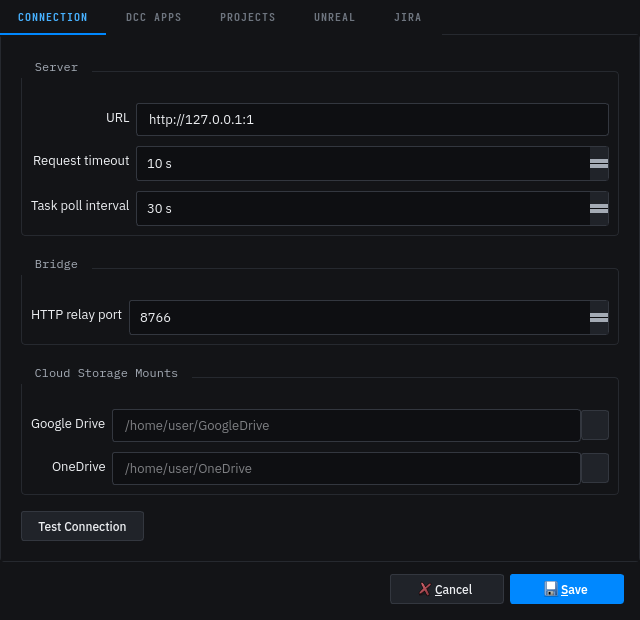
- Launch Arguments — extra command-line arguments, one per line, appended to the launch.
- Environment Variables — key/value pairs set on the DCC process. Your value wins over Dousen's on a plain conflict; for the search-path variables above, Dousen still merges its addon dir into your value rather than losing either.
These are per-machine settings. For anything the whole team needs, prefer startup scripts so the configuration lives in the project, not on workstations.
Related hooks
- Custom validators — separate mechanism, loaded from
validators.extra_paths; see Asset validation. - Standalone studio tools (outside a DCC) — register on the local relay and exchange events with everything else; see Bridge API.
Keeping the addons up to date
The Dousen addon for every DCC ships inside the DousenDesktop install, at DOUSEN_HOME/python/dousen/addons/<dcc> — there's no separate per-DCC package to distribute. DousenDesktop's auto-updater checks a signed manifest on a timer, and when a new build is available it downloads and verifies the same installer used for a fresh install (SHA-256 + Ed25519 signature, HTTPS only) before running it — refreshing the app, the bundled Python runtime, every DCC addon, and the Unreal plugin together in one step.
Practically: shipping a Dousen update updates every artist's addon code the next time they accept the update and relaunch a DCC — there's no separate "push the addon" step. Your studio's own startup scripts and custom validators are untouched by this, since they live in the project's pipeline settings on the server, not in the installed bundle.
When a script doesn't load
- Relaunch the DCC from DousenDesktop — the script list is resolved at launch time.
- Check the DCC's console for
Startup script not foundorStartup script failedlines; setDOUSEN_DEBUG=1for full tracebacks. - For depot paths, confirm the file is mapped and synced in the artist's workspace — an unmapped path is logged and skipped.
- See Troubleshooting for the general addon checklist.